
Elasticsearch Kibana Integration
The Censys for Elasticsearch Kibana connector adds the ability to:
- Enrich IPs, web properties, and certificates in Elasticsearch with Censys Platform data.
- Initiate a Censys rescan of a host or web property.
- Retrieve scan history for an IP address.
- Initiate a CensEye automated pivoting job to find assets related to an IP, web property, or certificate.
This guide walks through how to set up and use the Censys for Elasticsearch Kibana integration.
NoteMost of the Censys API calls used by this integration will deduct credits from your organization's balance. Reference the API documentation for more information on credit costs.
Prerequisites
-
Elastic Stack version 9.6.0 or higher.
-
An Elastic admin role user with access to your instance.
-
Your Censys Platform organization ID.
- To obtain your organization ID:
-
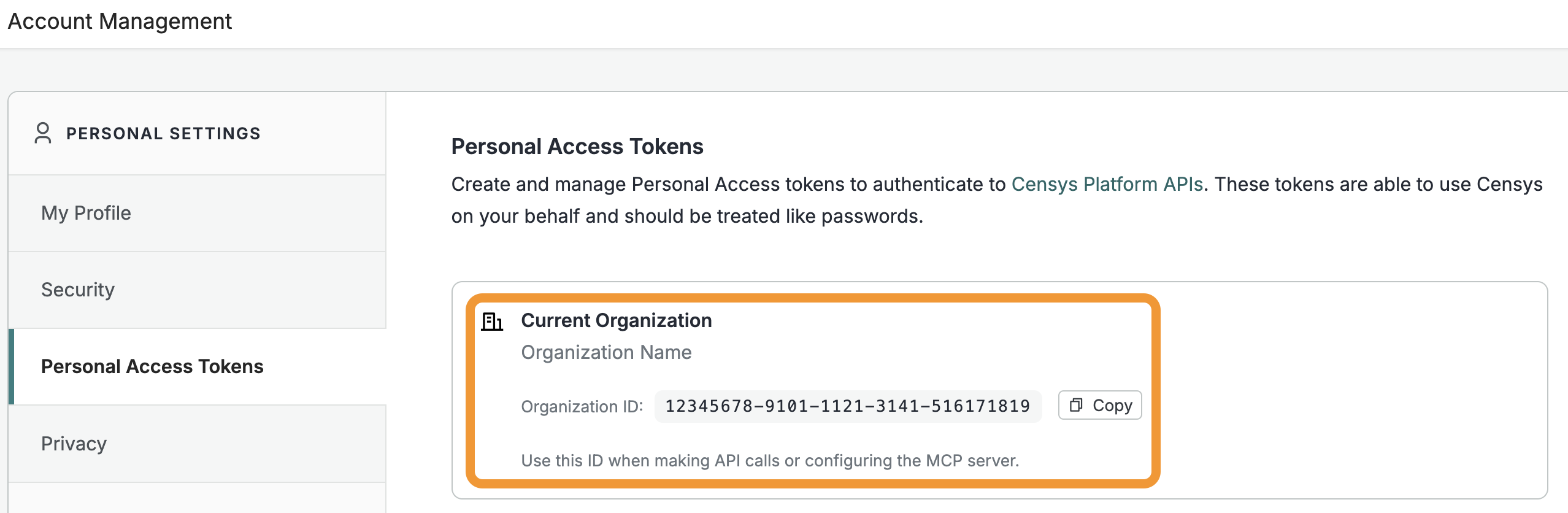
Open the Platform web console and ensure that your organization account is selected. Go to Settings > Account Management > Personal Access Tokens.
-
The ID for your organization is shown in the "Current Organization" box. Click Copy to copy it to your clipboard.
-
- To obtain your organization ID:
-
A Censys Platform Personal Access Token (PAT). Instructions on how to create and manage PATs are available in the API documentation.
Installation and configuration
- In the Elastic admin console, go to Stack Management > Alerts and insights > Connectors.
- Click Create connector. Locate and select Censys.
- On the connector configuration panel:
- In the Connector name field, enter a name for your connector. Note the automatically generated connector ID for use in workflow steps.
- In the "Organization ID" field, enter your Censys organization ID.
- In the "API Token" field, enter your PAT.
- Click Save.
Censys for Kibana actions
The Censys connector adds the following actions to Kibana.
Get Host
Retrieve comprehensive information about a host (IP address). Provides detailed intelligence about internet-facing infrastructure including services, ports, protocols, certificates, vulnerabilities, and location data.
Required input:
host: An IPv4 or IPv6 address to retrieve information about.
Example workflow
The following example retrieves all Censys data for the IP 8.8.8.8. To use this workflow, replace <connector-id> with your connector ID.
steps:
  - name: get_host
    type: censys.getHost
    connector-id: <connector-id>
    with:
      host: "8.8.8.8"
Get Host Enrichment
Retrieve a compact, SOC-optimized enrichment record for a host using its IP address. Returns a fixed subset of the latest scan data. Requires a Censys Core plan or higher. Core organizations are limited to 20,000 enrichment API calls per day. Organizations on the Censys Core + Unlimited Enrichment and Censys Security Operations plans can perform an unlimited number of enrichment API calls per day.
Required input:
host: An IPv4 or IPv6 address to retrieve information about.
Example workflow
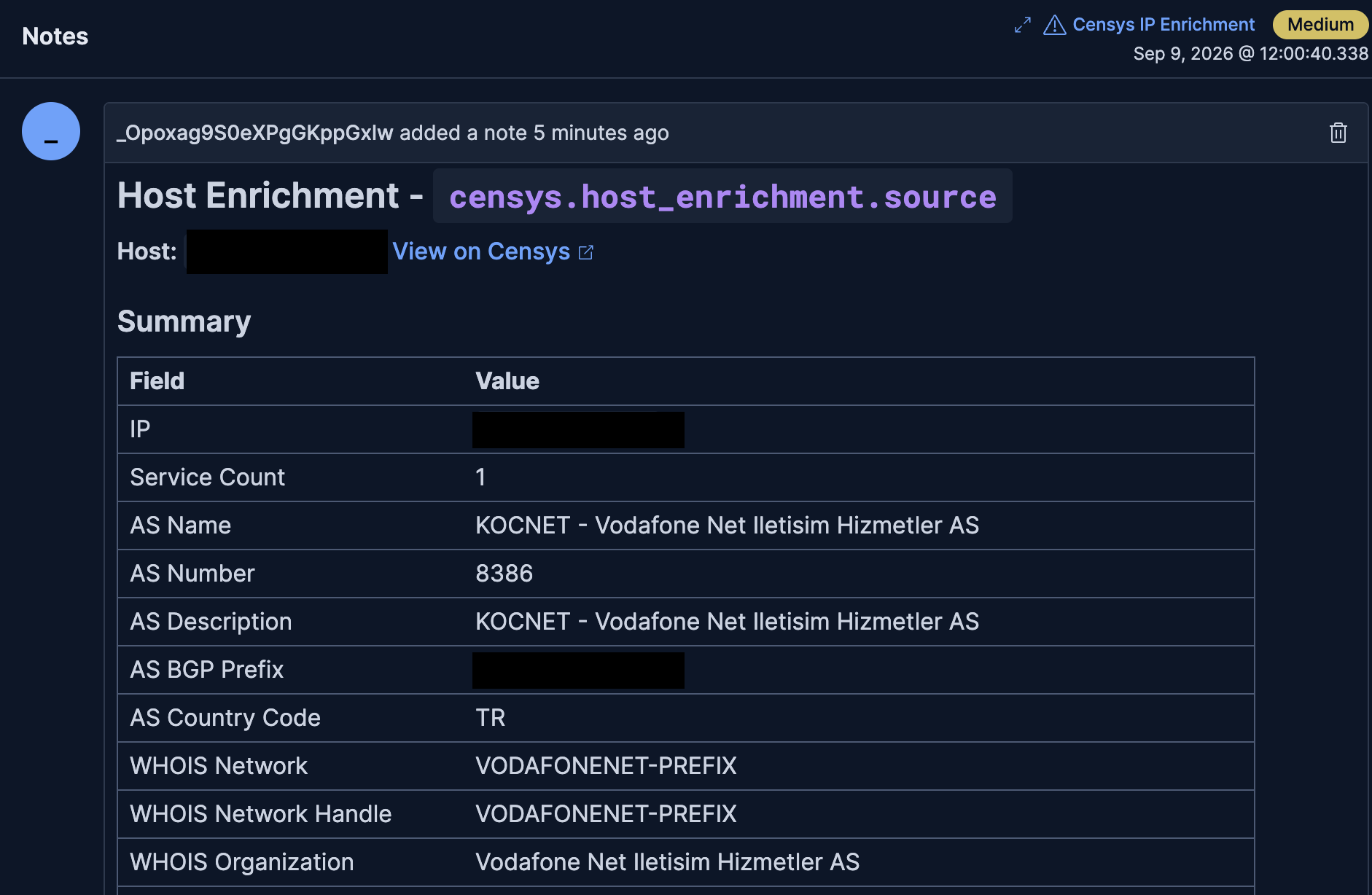
An alert note with Censys enrichment data for an IP that was retrieved using the workflow provided in this section.
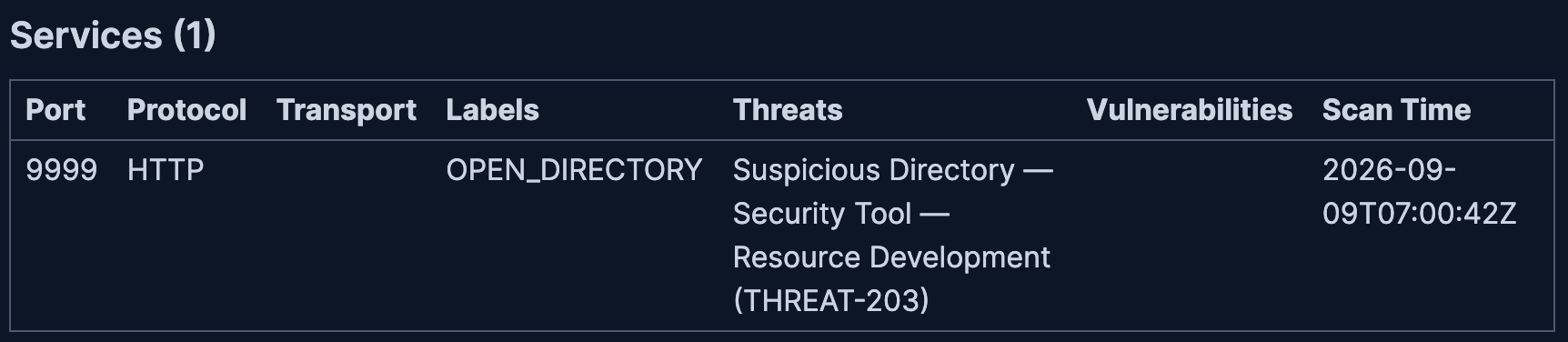
The services table in an example alert note that shows the presence of the suspicious directory threat.
The following example enriches an alert with Censys Platform host data for every available IP field host.ip, source.ip, destination.ip) independently. By default, each IP is looked up with the get host enrichment API endpoint (censys.getHostEnrichment). The workflow falls back to the get host API endpoint (censys.getHost) if the get host enrichment endpoint returns an error.
Set consts.use_host_enrichmentto false to always use censys.getHost. Each field is
written back under censys.host_enrichment.<field> on the alert document as the full Censys host resource (result.resource), for example censys.host_enrichment.host, .source, and .destination.
The dedicated host_enrichment namespace keeps this workflow's output separate from the other workflows. Manual runs use inputs.host and enrich under censys.host_enrichment.host only. When inputs.alert_index and inputs.alert_id are also provided the enrichment is written back to that document, otherwise the full host resource is logged to the workflow console.
To use this workflow, replace <connector-id> with your connector ID. Note that after pasting the workflow code into the Kibana console, the workflow builder UI may show that it cannot be enabled. However, it is enabled and can be added to rules.
version: '1'
name: Censys Host Enrichment
description: >-
Enrich an alert with Censys Platform host data for every available IP
field (host.ip, source.ip, destination.ip) independently. By default each
IP is looked up with the SOC-optimized censys.getHostEnrichment endpoint,
falling back to censys.getHost if the enrichment endpoint returns an error
(e.g. the organization lacks access to it); set consts.use_host_enrichment
to false to always use censys.getHost. Each field is
written back under censys.host_enrichment.<field> on the alert
document as the full Censys host resource (result.resource), e.g.
censys.host_enrichment.host, .source, .destination. The dedicated
host_enrichment namespace keeps this workflow's output separate from
the other workflows. Manual runs use inputs.host and enrich under
censys.host_enrichment.host only - when inputs.alert_index and
inputs.alert_id are also provided the enrichment is written back to
that document, otherwise the full host resource is logged to the
workflow console.
tags:
- censys
- enrichment
- security
- threat-intel
enabled: true
# Empty list used as a safe fallback (`| default: consts.empty_arr`) whenever a
# Censys response leaves out an optional array such as services, labels, or DNS
# names. Keeps later steps from failing on missing data.
consts:
connector_id: <connector-id>
# use_host_enrichment is true: try getHostEnrichment first, fall back to
# getHost on error. use_host_enrichment is false: always use getHost.
use_host_enrichment: true
empty_arr: []
triggers:
- type: manual
inputs:
- name: host
type: string
required: false
description: >-
IPv4 or IPv6 address. Used only on manual runs to enrich
censys.host_enrichment.host.* with that IP. Ignored on alert
triggers.
- name: alert_index
type: string
required: false
description: >-
Optional Elasticsearch index. When provided together with
alert_id on a manual run, the manual enrichment is written back
to that document under censys.host_enrichment.host.*. Ignored
on alert triggers.
- name: alert_id
type: string
required: false
description: >-
Optional Elasticsearch document ID. When provided together with
alert_index on a manual run, the manual enrichment is written
back to that document under censys.host_enrichment.host.*.
Ignored on alert triggers.
# NOTE: On alert triggers this workflow reads event.alerts[0], i.e. only the
# FIRST alert in the batch. When adding this workflow as a rule action, enable
# the "Run per alert" toggle so the rule invokes the workflow once per alert
# and every alert's data is processed (otherwise only the first is enriched).
- type: alert
steps:
# Decide which IPs to look up, as a list of {field, ip} pairs.
# • Alert run - one entry per non-blank IP on the alert (host.ip,
# source.ip, destination.ip), each enriched separately. Manual inputs
# are ignored.
# • Manual run - a single entry for the IP typed into `host`.
# The `field` value (host/source/destination) decides where the result is
# written later, under censys.host_enrichment.<field>.
- name: build_targets
type: data.parseJson
source: |-
[
{%- if event.alerts[0] != blank -%}
{%- assign sep = '' -%}
{%- if event.alerts[0].host.ip != blank -%}{{ sep }}{"field":"host","ip":"{{ event.alerts[0].host.ip }}"}{%- assign sep = ',' -%}{%- endif -%}
{%- if event.alerts[0].source.ip != blank -%}{{ sep }}{"field":"source","ip":"{{ event.alerts[0].source.ip }}"}{%- assign sep = ',' -%}{%- endif -%}
{%- if event.alerts[0].destination.ip != blank -%}{{ sep }}{"field":"destination","ip":"{{ event.alerts[0].destination.ip }}"}{%- endif -%}
{%- elsif inputs.host != blank -%}
{"field":"host","ip":"{{ inputs.host }}"}
{%- endif -%}
]
with: {}
# Work out which alert document to write results back to: the
# alert's own index/id on alert runs, or the optional alert_index/alert_id
# inputs on manual runs. If either is missing, the write steps are skipped
# and the result is logged to the console instead (see log_when_no_target_doc).
- name: resolve_target_doc
type: data.set
with:
target_index: "{{ event.alerts[0]._index | default: inputs.alert_index }}"
target_id: "{{ event.alerts[0]._id | default: inputs.alert_id }}"
# Run the full enrichment below once per IP picked by build_targets.
# `foreach.item` holds the current {field, ip} pair.
- name: enrich_each_field
type: foreach
foreach: "${{ steps.build_targets.output }}"
steps:
# Prefer getHostEnrichment; fall back to getHost on error (or when
# use_host_enrichment is false). Step names must stay get_host_enrichment /
# get_host (dashboards count step_name; names must be unique, so one
# get_host covers both the disabled and fallback paths).
- name: fetch_enrichment_preferred
type: if
condition: "${{ consts.use_host_enrichment == true }}"
steps:
- name: get_host_enrichment
type: censys.getHostEnrichment
connector-id: "{{ consts.connector_id }}"
with:
host: "{{ foreach.item.ip }}"
on-failure:
continue: true
# getHostEnrichment failed - most often an access-related error
# (401/403/409) on orgs without the enrichment entitlement, but any
# error triggers the fallback so the workflow still enriches instead
# of failing. Retry the lookup with the classic getHost endpoint.
- name: fallback_to_get_host
type: if
condition: "${{ steps.get_host_enrichment.error != blank }}"
steps:
- name: log_fallback_to_get_host
type: console
with:
message: |-
censys.getHostEnrichment failed for {{ foreach.item.field }} ({{ foreach.item.ip }}); falling back to censys.getHost.
{{ steps.get_host_enrichment.error | json }}
# getHost when enrichment is off or get_host_enrichment failed.
- name: fetch_get_host
type: if
condition: "${{ consts.use_host_enrichment != true or steps.get_host_enrichment.error != blank }}"
steps:
- name: get_host
type: censys.getHost
connector-id: "{{ consts.connector_id }}"
with:
host: "{{ foreach.item.ip }}"
on-failure:
continue: true
# Prefer enrichment result, else getHost.
#
# NOTE ON invalidVariableReference: `host` below is the full resource
# object, but its value comes from a runtime `${{ }}` expression, so the
# workflow validator infers its type from the literal YAML string
# ("${{ ... }}") rather than from the object it evaluates to at
# runtime - it sees a string, not an object. Any later `variables.host.x`
# access is therefore flagged as invalidVariableReference, even though it
# works fine when the workflow actually runs. `steps.<name>.output`,
# by contrast, has no declared output schema for this connector, so the
# validator treats it as `unknown` and allows arbitrary property chains
# on it without error. So every field the note/normalize steps need is
# pulled directly off `steps.get_host_enrichment.output...` /
# `steps.get_host.output...` here and stashed as its own top-level
# variable - each is a single, unchained `variables.<name>` reference
# downstream, which validates cleanly either way. `host` (the whole
# object) is kept only for the as-is write-back to Elasticsearch below,
# where it's used as a bare reference, not dotted into.
- name: stash_iter
type: data.set
with:
host: "${{ steps.get_host_enrichment.output.result.resource | default: steps.get_host.output.result.resource }}"
field_name: "{{ foreach.item.field }}"
host_ip: "{{ steps.get_host_enrichment.output.result.resource.ip | default: steps.get_host.output.result.resource.ip }}"
host_service_count: "{{ steps.get_host_enrichment.output.result.resource.service_count | default: steps.get_host.output.result.resource.service_count }}"
host_services: "${{ steps.get_host_enrichment.output.result.resource.services | default: steps.get_host.output.result.resource.services | default: consts.empty_arr }}"
host_labels: "${{ steps.get_host_enrichment.output.result.resource.labels | default: steps.get_host.output.result.resource.labels | default: consts.empty_arr }}"
as_name: "{{ steps.get_host_enrichment.output.result.resource.autonomous_system.name | default: steps.get_host.output.result.resource.autonomous_system.name }}"
as_asn: "{{ steps.get_host_enrichment.output.result.resource.autonomous_system.asn | default: steps.get_host.output.result.resource.autonomous_system.asn }}"
as_description: "{{ steps.get_host_enrichment.output.result.resource.autonomous_system.description | default: steps.get_host.output.result.resource.autonomous_system.description }}"
as_bgp_prefix: "{{ steps.get_host_enrichment.output.result.resource.autonomous_system.bgp_prefix | default: steps.get_host.output.result.resource.autonomous_system.bgp_prefix }}"
as_country_code: "{{ steps.get_host_enrichment.output.result.resource.autonomous_system.country_code | default: steps.get_host.output.result.resource.autonomous_system.country_code }}"
whois_network_name: "{{ steps.get_host_enrichment.output.result.resource.whois.network.name | default: steps.get_host.output.result.resource.whois.network.name }}"
whois_network_handle: "{{ steps.get_host_enrichment.output.result.resource.whois.network.handle | default: steps.get_host.output.result.resource.whois.network.handle }}"
whois_network_cidrs: "${{ steps.get_host_enrichment.output.result.resource.whois.network.cidrs | default: steps.get_host.output.result.resource.whois.network.cidrs | default: consts.empty_arr }}"
whois_org_name: "{{ steps.get_host_enrichment.output.result.resource.whois.organization.name | default: steps.get_host.output.result.resource.whois.organization.name }}"
whois_org_address: "{{ steps.get_host_enrichment.output.result.resource.whois.organization.address | default: steps.get_host.output.result.resource.whois.organization.address }}"
loc_city: "{{ steps.get_host_enrichment.output.result.resource.location.city | default: steps.get_host.output.result.resource.location.city }}"
loc_province: "{{ steps.get_host_enrichment.output.result.resource.location.province | default: steps.get_host.output.result.resource.location.province }}"
loc_postal_code: "{{ steps.get_host_enrichment.output.result.resource.location.postal_code | default: steps.get_host.output.result.resource.location.postal_code }}"
loc_country: "{{ steps.get_host_enrichment.output.result.resource.location.country | default: steps.get_host.output.result.resource.location.country }}"
loc_country_code: "{{ steps.get_host_enrichment.output.result.resource.location.country_code | default: steps.get_host.output.result.resource.location.country_code }}"
loc_continent: "{{ steps.get_host_enrichment.output.result.resource.location.continent | default: steps.get_host.output.result.resource.location.continent }}"
loc_lat: "{{ steps.get_host_enrichment.output.result.resource.location.coordinates.latitude | default: steps.get_host.output.result.resource.location.coordinates.latitude }}"
loc_lon: "{{ steps.get_host_enrichment.output.result.resource.location.coordinates.longitude | default: steps.get_host.output.result.resource.location.coordinates.longitude }}"
dns_names: "${{ steps.get_host_enrichment.output.result.resource.dns.names | default: steps.get_host.output.result.resource.dns.names | default: consts.empty_arr }}"
dns_forward_names: "${{ steps.get_host_enrichment.output.result.resource.dns.forward_dns.names | default: steps.get_host.output.result.resource.dns.forward_dns.names | default: consts.empty_arr }}"
dns_reverse_names: "${{ steps.get_host_enrichment.output.result.resource.dns.reverse_dns.names | default: steps.get_host.output.result.resource.dns.reverse_dns.names | default: consts.empty_arr }}"
host_greynoise: "${{ steps.get_host_enrichment.output.result.resource.greynoise | default: steps.get_host.output.result.resource.greynoise }}"
greynoise_classification: "{{ steps.get_host_enrichment.output.result.resource.greynoise.classification | default: steps.get_host.output.result.resource.greynoise.classification }}"
greynoise_actor: "{{ steps.get_host_enrichment.output.result.resource.greynoise.actor | default: steps.get_host.output.result.resource.greynoise.actor }}"
greynoise_last_seen: "{{ steps.get_host_enrichment.output.result.resource.greynoise.last_observed_time | default: steps.get_host.output.result.resource.greynoise.last_observed_time }}"
# If every Censys lookup for this IP failed, log it and move on to the
# next IP. This prevents writing an empty enrichment and note to the alert.
- name: skip_on_fetch_error
type: if
condition: "${{ variables.host == blank }}"
steps:
- name: log_fetch_error
type: console
with:
message: |-
Censys lookup failed for {{ foreach.item.field }} ({{ foreach.item.ip }}); skipping enrichment.
- name: skip_iteration
type: loop.continue
# Keep only the service fields we store/display (port, protocol, vulns,
# labels, threats, etc.). The default guards against a missing services list.
- name: normalize_services
type: data.map
items: "${{ variables.host_services }}"
with:
fields:
port: "${{ item.port }}"
protocol: "${{ item.protocol }}"
transport_protocol: "{{ item.transport_protocol }}"
scan_time: "${{ item.scan_time }}"
vulns: "{{ item.vulns | default: consts.empty_arr | map: 'id' | join: ', ' }}"
labels:
$map: { items: "${{ item.labels | default: consts.empty_arr }}", item: "label" }
value: "${{ label.value }}"
threats:
$map: { items: "${{ item.threats | default: consts.empty_arr }}", item: "threat" }
name: "${{ threat.name }}"
type: "${{ threat.type }}"
tactic: "${{ threat.tactic }}"
id: "${{ threat.id }}"
# Note display: "name - type - tactic (id)" per threat. type and
# tactic are arrays, so each value is title-cased
# (COMMAND_AND_CONTROL → Command And Control) and the values are
# comma-separated; threats are separated by <br> so each one starts
# on its own line inside the Threats table cell. "" when none.
# `split` stringifies an array, so every array must be iterated
# element by element - splitting the array directly concatenates
# values ("Security Toolremote Access Tool").
threats_display: |-
{%- assign threats_list = item.threats | default: consts.empty_arr -%}
{%- assign threat_sep = '' -%}
{%- for t in threats_list -%}
{%- assign type_display = '' -%}
{%- assign type_sep = '' -%}
{%- assign type_values = t.type | default: consts.empty_arr -%}
{%- for type_value in type_values -%}
{%- assign type_text = '' -%}
{%- assign word_sep = '' -%}
{%- assign type_words = type_value | split: '_' -%}
{%- for word in type_words -%}
{%- assign word_text = word | capitalize -%}
{%- assign type_text = type_text | append: word_sep | append: word_text -%}
{%- assign word_sep = ' ' -%}
{%- endfor -%}
{%- assign type_display = type_display | append: type_sep | append: type_text -%}
{%- assign type_sep = ', ' -%}
{%- endfor -%}
{%- assign tactic_display = '' -%}
{%- assign tactic_sep = '' -%}
{%- assign tactic_values = t.tactic | default: consts.empty_arr -%}
{%- for tactic_value in tactic_values -%}
{%- assign tactic_text = '' -%}
{%- assign word_sep = '' -%}
{%- assign tactic_words = tactic_value | split: '_' -%}
{%- for word in tactic_words -%}
{%- assign word_text = word | capitalize -%}
{%- assign tactic_text = tactic_text | append: word_sep | append: word_text -%}
{%- assign word_sep = ' ' -%}
{%- endfor -%}
{%- assign tactic_display = tactic_display | append: tactic_sep | append: tactic_text -%}
{%- assign tactic_sep = ', ' -%}
{%- endfor -%}
{{- threat_sep -}}{{ t.name }} — {{ type_display }} — {{ tactic_display }} ({{ t.id }})
{%- assign threat_sep = '<br>' -%}
{%- endfor -%}
on-failure:
continue: true
# Keep only the text value of each host-level label.
- name: normalize_host_labels
type: data.map
items: "${{ variables.host_labels }}"
with:
fields:
value: "${{ item.value }}"
on-failure:
continue: true
# Write the full Censys host resource (result.resource) onto the alert
# under the field it came from: censys.host_enrichment.host / .source /
# .destination. The outer `if` only runs when a target document exists;
# the `switch` picks the slot by field name. Manual runs with no alert
# document skip this and log to the console.
- name: dispatch_writes
type: if
condition: "${{ variables.target_index != blank and variables.target_id != blank }}"
steps:
- name: route_by_field
type: switch
expression: "{{ variables.field_name }}"
cases:
- match: "host"
steps:
- name: do_write_host
type: elasticsearch.update
with:
index: "{{ variables.target_index }}"
id: "{{ variables.target_id }}"
doc:
censys:
host_enrichment:
host: "${{ variables.host }}"
on-failure:
continue: true
- match: "source"
steps:
- name: do_write_source
type: elasticsearch.update
with:
index: "{{ variables.target_index }}"
id: "{{ variables.target_id }}"
doc:
censys:
host_enrichment:
source: "${{ variables.host }}"
on-failure:
continue: true
- match: "destination"
steps:
- name: do_write_destination
type: elasticsearch.update
with:
index: "{{ variables.target_index }}"
id: "{{ variables.target_id }}"
doc:
censys:
host_enrichment:
destination: "${{ variables.host }}"
on-failure:
continue: true
default:
- name: log_unknown_field
type: console
with:
message: "Host enrichment: unexpected field_name '{{ variables.field_name }}', no write performed."
# Add a readable note to the alert summarizing what Censys returned for
# this IP - Summary, GreyNoise, IPInfo (combined network+privacy from
# array objects with source IPINFO; missing fields default to false),
# Mallory, and Services tables. One note per enriched field. Skipped on
# manual runs that have no alert document.
- name: add_note_branch
type: if
condition: "${{ variables.target_index != blank and variables.target_id != blank }}"
steps:
- name: add_alert_note
type: kibana.request
with:
method: PATCH
path: /api/note
body:
note:
timelineId: ""
eventId: "{{ variables.target_id }}"
note: |-
## Host Enrichment - `censys.host_enrichment.{{ variables.field_name }}`
**Host:** `{{ variables.host_ip }}` - [View on Censys](https://platform.censys.io/hosts/{{ variables.host_ip | url_encode }})
### Summary
| Field | Value |
| :--- | :--- |
| IP | `{{ variables.host_ip }}` |
| Service Count | {{ variables.host_service_count }} |
| AS Name | {{ variables.as_name }} |
| AS Number | {{ variables.as_asn }} |
| AS Description | {{ variables.as_description }} |
| AS BGP Prefix | {{ variables.as_bgp_prefix }} |
| AS Country Code | {{ variables.as_country_code }} |
| WHOIS Network | {{ variables.whois_network_name }} |
| WHOIS Network Handle | {{ variables.whois_network_handle }} |
| WHOIS Organization | {{ variables.whois_org_name }} |
| WHOIS Organization Address | {{ variables.whois_org_address }} |
| City | {{ variables.loc_city }} |
| Province | {{ variables.loc_province }} |
| Postal Code | {{ variables.loc_postal_code }} |
| Country | {{ variables.loc_country }}{% if variables.loc_country_code != blank %} ({{ variables.loc_country_code }}){% endif %} |
| Continent | {{ variables.loc_continent }} |
| Coordinates | {% if variables.loc_lat != blank and variables.loc_lon != blank %}{{ variables.loc_lat }}, {{ variables.loc_lon }}{% endif %} |
| Host Labels | {{ steps.normalize_host_labels.output | map: 'value' | join: ', ' }} |
| DNS Names | {{ variables.dns_names | join: ', ' }} |
| Forward DNS Names | {{ variables.dns_forward_names | join: ', ' }} |
| Reverse DNS Names | {{ variables.dns_reverse_names | join: ', ' }} |
| Network CIDRs | {{ variables.whois_network_cidrs | join: ', ' }} |
{%- if variables.host_greynoise != blank %}
### GreyNoise
| Field | Value |
| :--- | :--- |
| Classification | {{ variables.greynoise_classification }} |
| Threat Actor | {{ variables.greynoise_actor }} |
| Last Seen Scanned | {{ variables.greynoise_last_seen }} |
{%- endif %}
{%- assign ipinfo_network = steps.get_host_enrichment.output.result.resource.network | default: steps.get_host.output.result.resource.network | default: consts.empty_arr | where: "source", "IPINFO" | first -%}
{%- assign ipinfo_privacy = steps.get_host_enrichment.output.result.resource.privacy | default: steps.get_host.output.result.resource.privacy | default: consts.empty_arr | where: "source", "IPINFO" | first -%}
{%- if ipinfo_network != blank or ipinfo_privacy != blank %}
### IPInfo
| Field | Value |
| :--- | :--- |
| Network Hosting | {{ ipinfo_network.hosting | default: false }} |
| Network Mobile | {{ ipinfo_network.mobile | default: false }} |
| Network Satellite | {{ ipinfo_network.satellite | default: false }} |
| Privacy Anonymous | {{ ipinfo_privacy.anonymous | default: false }} |
| Privacy Tor | {{ ipinfo_privacy.tor | default: false }} |
| Privacy Proxy | {{ ipinfo_privacy.proxy | default: false }} |
| Privacy Relay | {{ ipinfo_privacy.relay | default: false }} |
| Privacy VPN | {{ ipinfo_privacy.vpn | default: false }} |
{%- endif %}
{%- assign m = steps.get_host_enrichment.output.result.resource.third_party.mallory | default: steps.get_host.output.result.resource.third_party.mallory | default: consts.empty_arr | first -%}
{%- if m != blank %}
### Mallory
{%- assign opinion = m.opinions | default: consts.empty_arr | first -%}
{%- if opinion != blank %}
| Field | Value |
| :--- | :--- |
| Name | `{{ m.observable.name }}` |
| Type | {{ m.observable.type }} |
| Last Update At | {{ m.updated_at }} |
| Description | {{ m.observable.description }} |
| Verdict | {{ opinion.verdict | capitalize }} |
| Confidence | {% if opinion.confidence != blank %}{{ opinion.confidence }}{% else %}-{% endif %} |
| Mallory's Source | {{ opinion.source }} |
{%- else %}
| Field | Value |
| :--- | :--- |
| Name | `{{ m.observable.name }}` |
| Type | {{ m.observable.type }} |
| Last Update At | {{ m.updated_at }} |
| Description | {{ m.observable.description }} |
| Verdict | - |
| Confidence | - |
| Mallory's Source | - |
{%- endif %}
{%- endif %}
{%- assign services_count = steps.normalize_services.output | size -%}
{%- if services_count > 0 %}
### Services ({{ services_count }})
| Port | Protocol | Transport | Labels | Threats | Vulnerabilities | Scan Time |
| :--- | :--- | :--- | :--- | :--- | :--- | :--- |
{%- for s in steps.normalize_services.output %}
| {{ s.port }} | {{ s.protocol }} | {{ s.transport_protocol }} | {{ s.labels | default: consts.empty_arr | map: 'value' | join: ', ' }} | {{ s.threats_display }} | {{ s.vulns }} | {{ s.scan_time }} |
{%- endfor %}
{%- endif %}
on-failure:
continue: true
# Fallback when there is no alert document to update (e.g. a manual run
# without alert_index/alert_id): print the enrichment to the console so
# the result is still visible.
- name: log_when_no_target_doc
type: if
condition: "${{ variables.target_index == blank or variables.target_id == blank }}"
steps:
- name: console_log_enrichment
type: console
with:
message: |-
Censys enrichment for {{ variables.field_name }} ({{ variables.host_ip }}):
View on Censys: https://platform.censys.io/hosts/{{ variables.host_ip | url_encode }}
{{ variables.host | json }}
Get Web Property
Retrieve information about a web property using a specified hostname and port.
Required input:
hostname: The hostname, domain, or IP address (IPv4 or IPv6).port: Port number (1 to 65535).
Example workflow
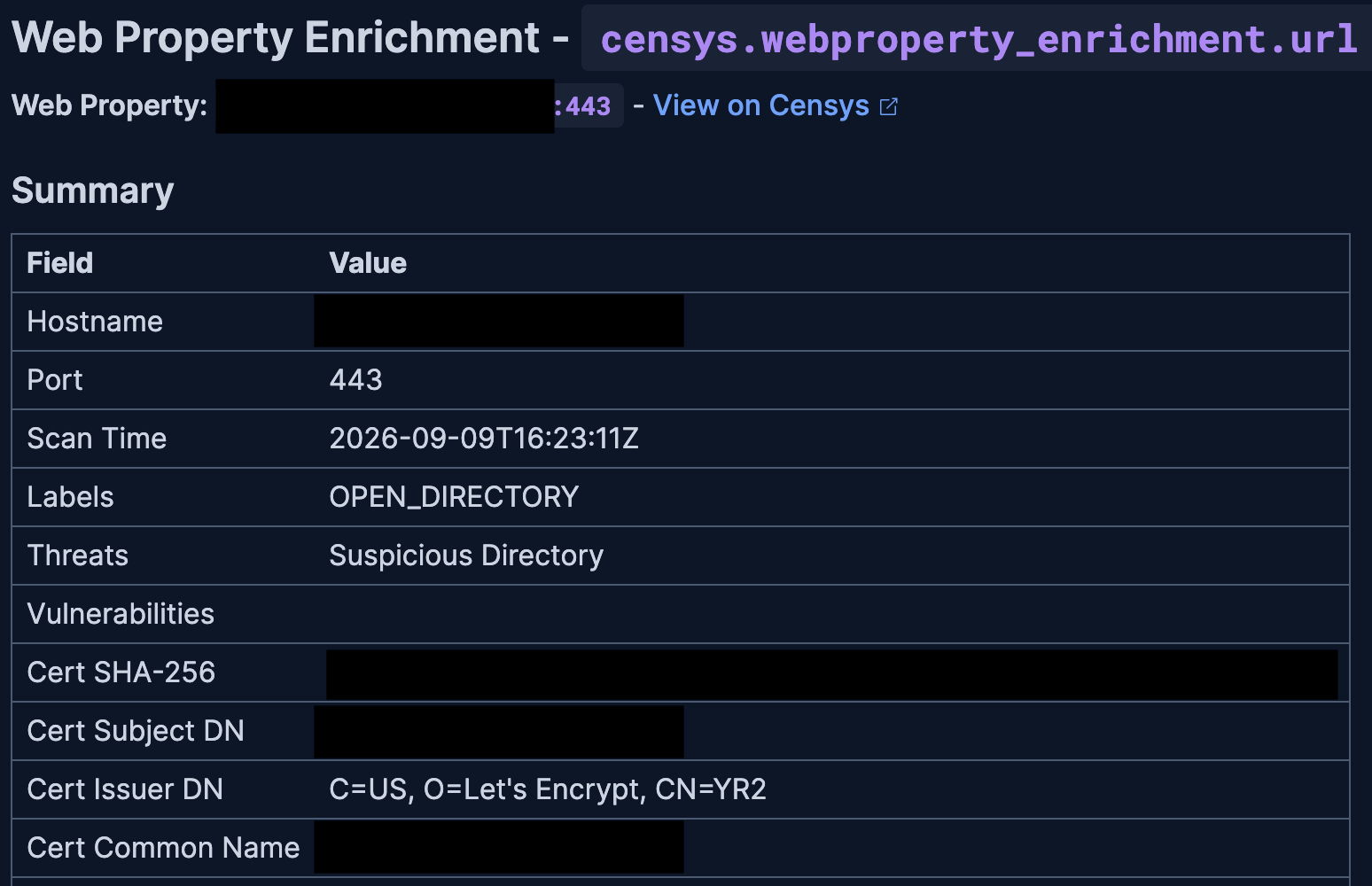
An alert note with Censys enrichment data for a web property that was retrieved using the workflow provided in this section.
This example workflow enriches an alert with Censys Platform web property data. Each hostname and port pair is enriched independently and written back under censys.webproperty_enrichment.<field> on the alert document as the full Censys web property resource.
The dedicated webproperty_enrichment namespace keeps this workflow's output separate from host enrichment. Manual runs use inputs.hostname and inputs.port; when alert_index and alert_id are also provided the enrichment is written back to that document under censys.webproperty_enrichment, otherwise the full web property resource is logged to the workflow console.
To use this workflow, replace <connector-id> with your connector ID. Note that after pasting the workflow code into the Kibana console, the workflow builder UI may show that it cannot be enabled. However, it is enabled and can be added to rules.
version: '1'
name: Censys Web Property Enrichment
description: >-
  Enrich an alert with Censys Platform getWebProperty data for every available
  (hostname-or-IP, port) pair derived from ECS fields. Each pair is enriched
  independently and written back under censys.webproperty_enrichment.<field>
  on the alert document as the full Censys web property resource
  (result.resource) (censys.webproperty_enrichment.url / .destination /
  .source). The dedicated webproperty_enrichment namespace keeps this
  workflow's output separate from the host enrichment, which writes to
  censys.host_enrichment.<field>. Manual runs use inputs.hostname and
  inputs.port; when alert_index and alert_id are also provided the
  enrichment is written back to that document under
  censys.webproperty_enrichment, otherwise the full web property resource
  is logged to the workflow console.
tags:
  - censys
  - enrichment
  - security
  - threat-intel
enabled: true

consts:
  connector_id: "<connector-id>"
  empty_arr: []

triggers:
  - type: manual
    inputs:
      - name: hostname
        type: string
        required: false
        description: >-
          Hostname, domain, or IPv4/IPv6 address. Used only on manual runs.
          Combined with `port` to form the web property identifier.
      - name: port
        type: number
        required: false
        description: >-
          TCP/UDP port (1–65535). Required on manual runs alongside
          `hostname`.
      - name: alert_index
        type: string
        required: false
        description: >-
          Optional Elasticsearch index. When provided together with alert_id
          on a manual run, the enrichment is written back to that document
          under censys.webproperty_enrichment.*. Ignored on alert triggers.
      - name: alert_id
        type: string
        required: false
        description: >-
          Optional Elasticsearch document ID. When provided together with
          alert_index on a manual run, the enrichment is written back to
          that document under censys.webproperty_enrichment.*. Ignored on
          alert triggers.
  # NOTE: On alert triggers this workflow reads event.alerts[0], i.e. only the
  # FIRST alert in the batch. When adding this workflow as a rule action, enable
  # the "Run per alert" toggle so the rule invokes the workflow once per alert
  # and every alert's data is processed (otherwise only the first is enriched).
  - type: alert


steps:
  # Decide which web properties to look up, as a list of {field, hostname, port}
  # entries.
  #   • Alert run  - one entry per non-blank (hostname/IP, port) pair on the
  #     alert (url, destination, source), each enriched separately. For
  #     destination the domain is preferred over the IP when both are present.
  #   • Manual run - a single entry for the hostname + port you type in.
  # The `field` value decides where the result is written later, under
  # censys.webproperty_enrichment.
  - name: build_targets
    type: data.parseJson
    source: |-
      [
      {%- if event.alerts[0] != blank -%}
        {%- assign sep = '' -%}
        {%- if event.alerts[0].url.domain != blank and event.alerts[0].url.port != blank -%}{{ sep }}{"field":"url","hostname":"{{ event.alerts[0].url.domain }}","port":{{ event.alerts[0].url.port }}}{%- assign sep = ',' -%}{%- endif -%}
        {%- if event.alerts[0].destination.domain != blank and event.alerts[0].destination.port != blank -%}{{ sep }}{"field":"destination","hostname":"{{ event.alerts[0].destination.domain }}","port":{{ event.alerts[0].destination.port }}}{%- assign sep = ',' -%}{%- elsif event.alerts[0].destination.ip != blank and event.alerts[0].destination.port != blank -%}{{ sep }}{"field":"destination","hostname":"{{ event.alerts[0].destination.ip }}","port":{{ event.alerts[0].destination.port }}}{%- assign sep = ',' -%}{%- endif -%}
        {%- if event.alerts[0].source.ip != blank and event.alerts[0].source.port != blank -%}{{ sep }}{"field":"source","hostname":"{{ event.alerts[0].source.ip }}","port":{{ event.alerts[0].source.port }}}{%- endif -%}
      {%- elsif inputs.hostname != blank and inputs.port != blank -%}
        {"field":"web_property","hostname":"{{ inputs.hostname }}","port":{{ inputs.port }}}
      {%- endif -%}
      ]
    with: {}

  # Work out which alert document to write results back to: the alert's own
  # index/id on alert runs, or the optional alert_index/alert_id inputs on
  # manual runs. If either is missing, results are logged to the console
  # instead (see log_when_no_target_doc).
  - name: resolve_target_doc
    type: data.set
    with:
      target_index: "{{ event.alerts[0]._index | default: inputs.alert_index }}"
      target_id: "{{ event.alerts[0]._id | default: inputs.alert_id }}"

  # Run the enrichment below once per web property. `foreach.item` holds the
  # current {field, hostname, port} entry.
  - name: enrich_each_field
    type: foreach
    foreach: "${{ steps.build_targets.output }}"
    steps:

      # Look up this web property (hostname + port) in Censys.
      - name: get_web_property
        type: censys.getWebProperty
        connector-id: "{{ consts.connector_id }}"
        with:
          hostname: "{{ foreach.item.hostname }}"
          port: "${{ foreach.item.port }}"
        on-failure:
          continue: true

      # If the Censys lookup failed, log the error and move on to the next web
      # property. This prevents writing an empty enrichment and an empty note
      # to the alert.
      - name: skip_on_fetch_error
        type: if
        condition: "${{ steps.get_web_property.error != blank }}"
        steps:
          - name: log_fetch_error
            type: console
            with:
              message: |-
                Censys getWebProperty failed for {{ foreach.item.field }} ({{ foreach.item.hostname }}:{{ foreach.item.port }}); skipping enrichment.
                {{ steps.get_web_property.error | json }}
          - name: skip_iteration
            type: loop.continue

      # Save this iteration's web property data and field name for the steps below.
      - name: stash_iter
        type: data.set
        with:
          web: "${{ steps.get_web_property.output.result.resource }}"
          field_name: "{{ foreach.item.field }}"

      # Keep only the endpoint fields we store/display (type and path).
      - name: normalize_endpoints
        type: data.map
        items: "${{ variables.web.endpoints | default: consts.empty_arr }}"
        with:
          fields:
            endpoint_type: "${{ item.endpoint_type }}"
            path: "${{ item.path }}"
        on-failure:
          continue: true

      # Keep only the software fields we store/display (vendor, product, version).
      - name: normalize_software
        type: data.map
        items: "${{ variables.web.software | default: consts.empty_arr }}"
        with:
          fields:
            vendor: "${{ item.vendor }}"
            product: "${{ item.product }}"
            version: "${{ item.version }}"
        on-failure:
          continue: true

      # Keep only the text value of each label.
      - name: normalize_labels
        type: data.map
        items: "${{ variables.web.labels | default: consts.empty_arr }}"
        with:
          fields:
            value: "${{ item.value }}"
        on-failure:
          continue: true

      # Write the full Censys web property resource (result.resource) onto the
      # alert under the field it came from: censys.webproperty_enrichment.url /
      # .destination / .source (or directly under censys.webproperty_enrichment
      # for a manual run). The outer `if` only runs when a target document
      # exists; the `switch` picks the slot by field name. Manual runs with no
      # alert document skip this and log to the console.
      - name: dispatch_writes
        type: if
        condition: "${{ variables.target_index != blank and variables.target_id != blank }}"
        steps:
          - name: route_by_field
            type: switch
            expression: "{{ variables.field_name }}"
            cases:
              - match: "url"
                steps:
                  - name: do_write_url
                    type: elasticsearch.update
                    with:
                      index: "{{ variables.target_index }}"
                      id: "{{ variables.target_id }}"
                      doc:
                        censys:
                          webproperty_enrichment:
                            url: "${{ variables.web }}"
                    on-failure:
                      continue: true
              - match: "web_property"
                steps:
                  - name: do_write_web_property
                    type: elasticsearch.update
                    with:
                      index: "{{ variables.target_index }}"
                      id: "{{ variables.target_id }}"
                      doc:
                        censys:
                          webproperty_enrichment: "${{ variables.web }}"
                    on-failure:
                      continue: true
              - match: "destination"
                steps:
                  - name: do_write_destination
                    type: elasticsearch.update
                    with:
                      index: "{{ variables.target_index }}"
                      id: "{{ variables.target_id }}"
                      doc:
                        censys:
                          webproperty_enrichment:
                            destination: "${{ variables.web }}"
                    on-failure:
                      continue: true
              - match: "source"
                steps:
                  - name: do_write_source
                    type: elasticsearch.update
                    with:
                      index: "{{ variables.target_index }}"
                      id: "{{ variables.target_id }}"
                      doc:
                        censys:
                          webproperty_enrichment:
                            source: "${{ variables.web }}"
                    on-failure:
                      continue: true
            default:
              - name: log_unknown_field
                type: console
                with:
                  message: "Web property enrichment: unexpected field_name '{{ variables.field_name }}', no write performed."

      # Add a readable note to the alert summarizing the web property - a
      # Summary table plus Endpoints and Software tables - with a link to view
      # it on Censys. One note per enriched field. Skipped on manual runs with
      # no alert document.
      - name: add_note_branch
        type: if
        condition: "${{ variables.target_index != blank and variables.target_id != blank }}"
        steps:
          - name: add_alert_note
            type: kibana.request
            with:
              method: PATCH
              path: /api/note
              body:
                note:
                  timelineId: ""
                  eventId: "{{ variables.target_id }}"
                  note: |-
                    ## Web Property Enrichment - `censys.webproperty_enrichment{% if variables.field_name != 'web_property' %}.{{ variables.field_name }}{% endif %}`

                    **Web Property:** `{{ variables.web.hostname }}:{{ variables.web.port }}` - [View on Censys](https://platform.censys.io/web/{{ variables.web.hostname | url_encode }}:{{ variables.web.port }})

                    ### Summary

                    | Field | Value |
                    | :--- | :--- |
                    | Hostname | `{{ variables.web.hostname }}` |
                    | Port | {{ variables.web.port }} |
                    | Scan Time | {{ variables.web.scan_time }} |
                    | Labels | {{ steps.normalize_labels.output | map: 'value' | join: ', ' }} |
                    | Threats | {{ variables.web.threats | default: consts.empty_arr | map: 'name' | join: ', ' }} |
                    | Vulnerabilities | {{ variables.web.vulns | default: consts.empty_arr | map: 'id' | join: ', ' }} |
                    | Cert SHA-256 | `{{ variables.web.cert.fingerprint_sha256 }}` |
                    | Cert Subject DN | {{ variables.web.cert.parsed.subject_dn }} |
                    | Cert Issuer DN | {{ variables.web.cert.parsed.issuer_dn }} |
                    | Cert Common Name | {{ variables.web.cert.parsed.subject.common_name }} |
                    | Cert Not Before | {{ variables.web.cert.parsed.validity_period.not_before }} |
                    | Cert Not After | {{ variables.web.cert.parsed.validity_period.not_after }} |
                    | Cert Self-Signed | {{ variables.web.cert.parsed.signature.self_signed }} |

                    {%- assign endpoints_count = steps.normalize_endpoints.output | size -%}
                    {%- if endpoints_count > 0 %}

                    ### Endpoints ({{ endpoints_count }})

                    | Type | Path |
                    | :--- | :--- |
                    {%- for e in steps.normalize_endpoints.output %}
                    | {{ e.endpoint_type }} | `{{ e.path }}` |
                    {%- endfor %}
                    {%- endif %}

                    {%- assign software_count = steps.normalize_software.output | size -%}
                    {%- if software_count > 0 %}

                    ### Software ({{ software_count }})

                    | Vendor | Product | Version |
                    | :--- | :--- | :--- |
                    {%- for s in steps.normalize_software.output %}
                    | {{ s.vendor }} | {{ s.product }} | {{ s.version }} |
                    {%- endfor %}
                    {%- endif %}
            on-failure:
              continue: true

      # Fallback when there is no alert document to update (e.g. a manual run
      # without alert_index/alert_id): print the enrichment to the console so
      # the result is still visible.
      - name: log_when_no_target_doc
        type: if
        condition: "${{ variables.target_index == blank or variables.target_id == blank }}"
        steps:
          - name: console_log_enrichment
            type: console
            with:
              message: |-
                Censys web property enrichment for {{ variables.field_name }} ({{ variables.web.hostname }}:{{ variables.web.port }}):
                View on Censys: https://platform.censys.io/web/{{ variables.web.hostname | url_encode }}:{{ variables.web.port }}
                {{ variables.web | json }}
Get Certificate
Retrieve information about a certificate by its SHA-256 fingerprint.
Required input:
certificate: 64-character SHA-256 hex string.
Example workflow
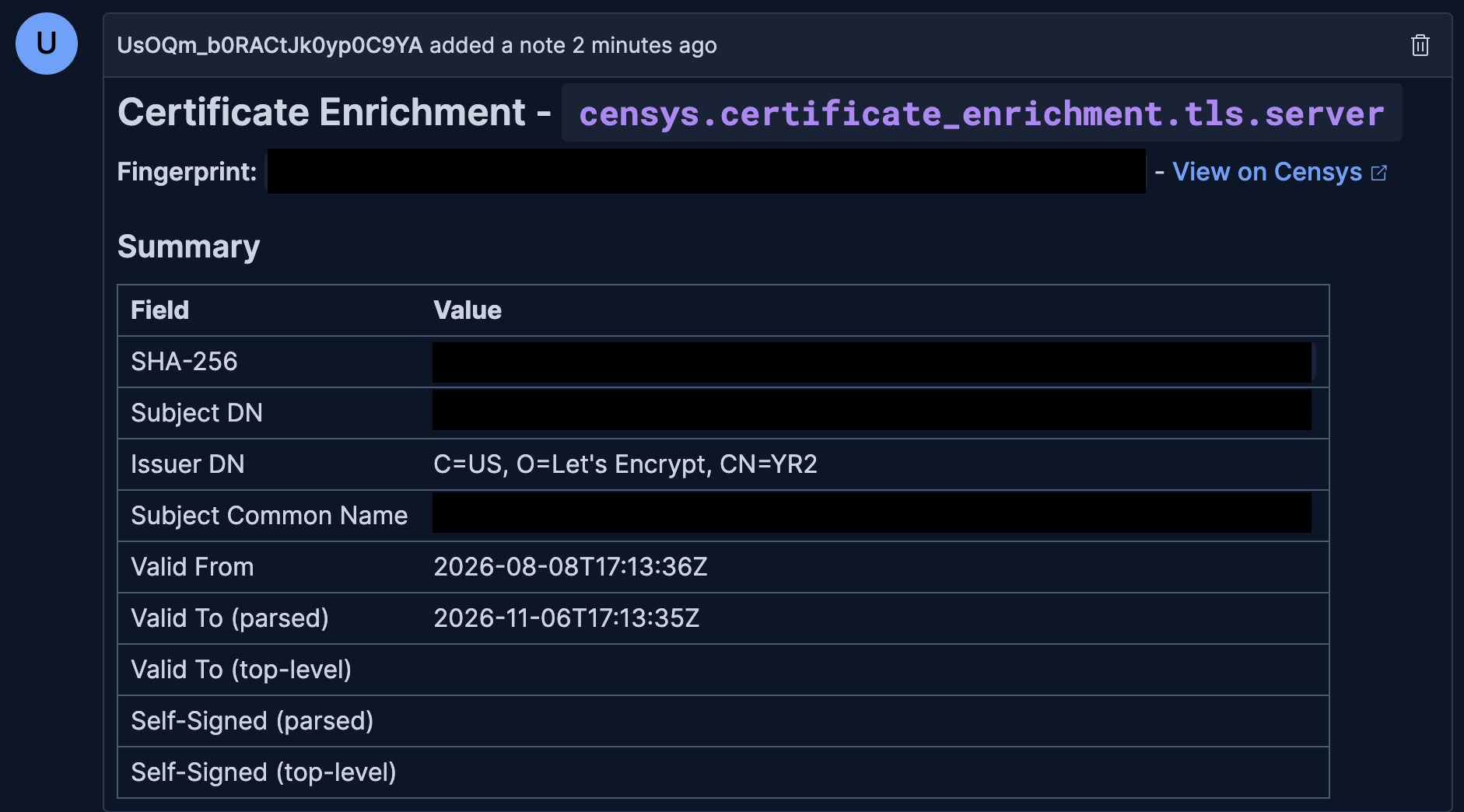
An alert note with Censys enrichment data for a certificate that was retrieved using the workflow provided in this section.
This example workflow enriches an alert with Censys Platform certificate data for every available
TLS certificate fingerprint on the alert (tls.server.hash.sha256, tls.client.hash.sha256). Each fingerprint is enriched independently and written back under censys.certificate_enrichment.<field> on the alert document as the full Censys certificate resource.
Manual runs use inputs.certificate_hash; when alert_index and alert_id are also provided
the enrichment is written back under censys.certificate_enrichment, otherwise the full certificate resource is logged to the workflow console.
To use this workflow, replace <connector-id> with your connector ID. Note that after pasting the workflow code into the Kibana console, the workflow builder UI may show that it cannot be enabled. However, it is enabled and can be added to rules.
version: '1'
name: Censys Certificate Enrichment
description: >-
  Enrich an alert with Censys Platform getCertificate data for every available
  TLS certificate fingerprint on the alert (tls.server.hash.sha256,
  tls.client.hash.sha256). Each fingerprint is enriched independently and
  written back under censys.certificate_enrichment.<field> on the alert
  document as the full Censys certificate resource (result.resource)
  (censys.certificate_enrichment.tls.server / .tls.client). Manual runs use
  inputs.certificate_hash; when alert_index and alert_id are also provided
  the enrichment is written back under censys.certificate_enrichment,
  otherwise the full certificate resource is logged to the workflow console.
tags:
  - censys
  - enrichment
  - security
  - threat-intel
enabled: true

consts:
  connector_id: "<connector-id>"

triggers:
  - type: manual
    inputs:
      - name: certificate_hash
        type: string
        required: false
        description: >-
          SHA-256 certificate fingerprint as a 64-character hex string.
          Used only on manual runs.
      - name: alert_index
        type: string
        required: false
        description: >-
          Optional Elasticsearch index. When provided together with alert_id
          on a manual run, the enrichment is written back to that document
          under censys.certificate_enrichment.*. Ignored on alert triggers.
      - name: alert_id
        type: string
        required: false
        description: >-
          Optional Elasticsearch document ID. When provided together with
          alert_index on a manual run, the enrichment is written back to
          that document under censys.certificate_enrichment.*. Ignored on
          alert triggers.
  # NOTE: On alert triggers this workflow reads event.alerts[0], i.e. only the
  # FIRST alert in the batch. When adding this workflow as a rule action, enable
  # the "Run per alert" toggle so the rule invokes the workflow once per alert
  # and every alert's data is processed (otherwise only the first is enriched).
  - type: alert


steps:
  # Decide which certificate fingerprints to look up, as a list of
  # {field, sha256} pairs.
  #   • Alert run  - one entry per non-blank fingerprint on the alert
  #     (tls.server.hash.sha256, tls.client.hash.sha256), enriched separately.
  #   • Manual run - a single entry for the fingerprint typed into
  #     certificate_hash.
  # The `field` value decides where the result is written later, under
  # censys.certificate_enrichment.
  - name: build_targets
    type: data.parseJson
    source: |-
      [
      {%- if event.alerts[0] != blank -%}
        {%- assign sep = '' -%}
        {%- if event.alerts[0].tls.server.hash.sha256 != blank -%}{{ sep }}{"field":"tls_server","sha256":"{{ event.alerts[0].tls.server.hash.sha256 }}"}{%- assign sep = ',' -%}{%- endif -%}
        {%- if event.alerts[0].tls.client.hash.sha256 != blank -%}{{ sep }}{"field":"tls_client","sha256":"{{ event.alerts[0].tls.client.hash.sha256 }}"}{%- endif -%}
      {%- elsif inputs.certificate_hash != blank -%}
        {"field":"manual","sha256":"{{ inputs.certificate_hash }}"}
      {%- endif -%}
      ]
    with: {}

  # Work out which alert document to write results back to: the alert's own
  # index/id on alert runs, or the optional alert_index/alert_id inputs on
  # manual runs. If either is missing, results are logged to the console
  # instead (see log_when_no_target_doc).
  - name: resolve_target_doc
    type: data.set
    with:
      target_index: "{{ event.alerts[0]._index | default: inputs.alert_index }}"
      target_id: "{{ event.alerts[0]._id | default: inputs.alert_id }}"

  # Run the enrichment below once per fingerprint. `foreach.item` holds the
  # current {field, sha256} pair.
  - name: enrich_each_field
    type: foreach
    foreach: "${{ steps.build_targets.output }}"
    steps:

      # Look up this certificate fingerprint in Censys.
      - name: get_certificate
        type: censys.getCertificate
        connector-id: "{{ consts.connector_id }}"
        with:
          certificate: "{{ foreach.item.sha256 }}"
        on-failure:
          continue: true

      # If the Censys lookup failed, log the error and move on to the next
      # fingerprint. This prevents writing an empty enrichment and an empty
      # note to the alert.
      - name: skip_on_fetch_error
        type: if
        condition: "${{ steps.get_certificate.error != blank }}"
        steps:
          - name: log_fetch_error
            type: console
            with:
              message: |-
                Censys getCertificate failed for {{ foreach.item.field }} ({{ foreach.item.sha256 }}); skipping enrichment.
                {{ steps.get_certificate.error | json }}
          - name: skip_iteration
            type: loop.continue

      # Save this iteration's certificate data and field name for the steps below.
      - name: stash_iter
        type: data.set
        with:
          cert: "${{ steps.get_certificate.output.result.resource }}"
          field_name: "{{ foreach.item.field }}"

      # Write the full Censys certificate resource (result.resource) onto the
      # alert under the field it came from: censys.certificate_enrichment.tls.server
      # / .tls.client (or directly under censys.certificate_enrichment for a
      # manual run). The outer `if` only runs when a target document exists;
      # the `switch` picks the slot by field name. Manual runs with no alert
      # document skip this and log to the console.
      - name: dispatch_writes
        type: if
        condition: "${{ variables.target_index != blank and variables.target_id != blank }}"
        steps:
          - name: route_by_field
            type: switch
            expression: "{{ variables.field_name }}"
            cases:
              - match: "tls_server"
                steps:
                  - name: do_write_tls_server
                    type: elasticsearch.update
                    with:
                      index: "{{ variables.target_index }}"
                      id: "{{ variables.target_id }}"
                      doc:
                        censys:
                          certificate_enrichment:
                            tls:
                              server: "${{ variables.cert }}"
                    on-failure:
                      continue: true
              - match: "tls_client"
                steps:
                  - name: do_write_tls_client
                    type: elasticsearch.update
                    with:
                      index: "{{ variables.target_index }}"
                      id: "{{ variables.target_id }}"
                      doc:
                        censys:
                          certificate_enrichment:
                            tls:
                              client: "${{ variables.cert }}"
                    on-failure:
                      continue: true
              - match: "manual"
                steps:
                  - name: do_write_manual
                    type: elasticsearch.update
                    with:
                      index: "{{ variables.target_index }}"
                      id: "{{ variables.target_id }}"
                      doc:
                        censys:
                          certificate_enrichment: "${{ variables.cert }}"
                    on-failure:
                      continue: true
            default:
              - name: log_unknown_field
                type: console
                with:
                  message: "Certificate enrichment: unexpected field_name '{{ variables.field_name }}', no write performed."

      # Add a readable note to the alert summarizing the certificate (subject,
      # issuer, validity, self-signed) with a link to view it on Censys. One
      # note per fingerprint. Skipped on manual runs with no alert document.
      - name: add_note_branch
        type: if
        condition: "${{ variables.target_index != blank and variables.target_id != blank }}"
        steps:
          - name: add_alert_note
            type: kibana.request
            with:
              method: PATCH
              path: /api/note
              body:
                note:
                  timelineId: ""
                  eventId: "{{ variables.target_id }}"
                  note: |-
                    ## Certificate Enrichment - `censys.certificate_enrichment{% if variables.field_name == 'tls_server' %}.tls.server{% elsif variables.field_name == 'tls_client' %}.tls.client{% endif %}`

                    **Fingerprint:** `{{ variables.cert.fingerprint_sha256 }}` - [View on Censys](https://platform.censys.io/certificates/{{ variables.cert.fingerprint_sha256 }})

                    ### Summary

                    | Field | Value |
                    | :--- | :--- |
                    | SHA-256 | `{{ variables.cert.fingerprint_sha256 }}` |
                    | Subject DN | {{ variables.cert.parsed.subject_dn }} |
                    | Issuer DN | {{ variables.cert.parsed.issuer_dn }} |
                    | Subject Common Name | {{ variables.cert.parsed.subject.common_name }} |
                    | Valid From | {{ variables.cert.parsed.validity_period.not_before }} |
                    | Valid To (parsed) | {{ variables.cert.parsed.validity_period.not_after }} |
                    | Valid To (top-level) | {{ variables.cert.valid_to }} |
                    | Self-Signed (parsed) | {{ variables.cert.parsed.signature.self_signed }} |
                    | Self-Signed (top-level) | {{ variables.cert.self_signed }} |
            on-failure:
              continue: true

      # Fallback when there is no alert document to update (e.g. a manual run
      # without alert_index/alert_id): print the enrichment to the console so
      # the result is still visible.
      - name: log_when_no_target_doc
        type: if
        condition: "${{ variables.target_index == blank or variables.target_id == blank }}"
        steps:
          - name: console_log_enrichment
            type: console
            with:
              message: |-
                Censys certificate enrichment for {{ variables.field_name }} ({{ variables.cert.fingerprint_sha256 }}):
                View on Censys: https://platform.censys.io/certificates/{{ variables.cert.fingerprint_sha256 }}
                {{ variables.cert | json }}
Get Host History
Retrieve the chronological scan timeline for a host over a specified time window.
Required input:
host: An IPv4 or IPv6 address.startTime: RFC3339 timestamp for the start of the window (for example,2025-01-01T00:00:00Z).endTime: RFC3339 timestamp for the end of the window. The end time must be later than the start time (for example,2025-01-31T23:59:59Z).
Example workflow
The following example retrieves the Censys Platform scan timeline for a host over a time window and attaches the timeline as a Kibana alert note. On alert triggers, the workflow pauses at a human-in-the-loop review step so the analyst can confirm or adjust the host IP and the start and end window before the Censys call is made. On manual runs, it skips the pause and uses the supplied inputs directly.
The timeline endpoint returns a single page of 100 records per call, so the workflow pages backwards using result.scanned_to as the next endTime until the window is fully covered or the 10-page (1,000-record) record display ceiling is reached.
The timeline note is attached to the alert document when inputs.alert_index/alert_id (or the alert's own _index/_id) are present; otherwise the timeline is logged to the workflow console.
To use this workflow, replace <connector-id> with your connector ID.
version: '1'
name: Censys Host History
description: >-
  Retrieve the Censys Platform scan timeline for a host over a time window
  and attach the timeline as a Kibana alert note. On alert triggers the
  workflow pauses at a human-in-the-loop review step so the analyst can
  confirm or adjust the host IP and the start/end window before the
  Censys call is made; on manual runs it skips the pause and uses the
  supplied inputs directly. The connector swaps start/end internally
  (Censys timeline expects start_time to be the most recent timestamp),
  so the workflow always passes the window in normal chronological order
  (start_time <= end_time). The timeline endpoint returns a single page
  (100 records) per call, so the workflow pages backwards using result.scanned_to as
  the next endTime until the window is fully covered or the 10-page /
  1000-record display ceiling is reached. The timeline note is attached to the
  alert document when inputs.alert_index/alert_id (or the alert's own _index/_id)
  are present; otherwise the timeline is logged to the workflow console.
tags:
  - censys
  - host-history
  - security
  - hitl
enabled: true

consts:
  connector_id: "<connector-id>"
  empty_arr: []

triggers:
  - type: manual
    inputs:
      - name: host
        type: string
        required: false
        description: >-
          IPv4 or IPv6 address. Manual-run only; on alert triggers the
          host IP is resolved from event.alerts[0] (host.ip then
          source.ip then destination.ip, first non-blank wins).
      - name: start_time
        type: string
        required: false
        description: >-
          Start of the history window, RFC3339 (e.g.
          "2026-05-01T00:00:00Z"). Manual-run only.
      - name: end_time
        type: string
        required: false
        description: >-
          End of the history window, RFC3339 (e.g.
          "2026-05-08T00:00:00Z"). Manual-run only. Must be >=
          start_time; the connector swaps them before calling Censys.
      - name: alert_index
        type: string
        required: false
        description: >-
          Optional Elasticsearch alert index. When provided with
          alert_id, the timeline note is attached to that document.
          Ignored on alert triggers.
      - name: alert_id
        type: string
        required: false
        description: >-
          Optional Elasticsearch alert document ID. When provided with
          alert_index, the timeline note is attached to that document.
          Ignored on alert triggers.
  # NOTE: On alert triggers this workflow reads event.alerts[0], i.e. only the
  # FIRST alert in the batch. When adding this workflow as a rule action, enable
  # the "Run per alert" toggle so the rule invokes the workflow once per alert
  # and every alert's data is processed (otherwise only the first is enriched).
  - type: alert

steps:

  # Pick the host IP to use on alert runs: host.ip, then source.ip, then
  # destination.ip (first non-blank wins). Manual runs use inputs.host instead.
  - name: pick_alert_host
    type: data.set
    with:
      alert_host_ip: >-
        {{ event.alerts[0].host.ip
           | default: event.alerts[0].source.ip
           | default: event.alerts[0].destination.ip }}

  # Default time window shown in the review form: end = now, start = 7 days
  # ago, both in RFC3339 UTC (604800 = 7 days in seconds).
  - name: compute_default_window
    type: data.set
    with:
      default_end_time: "{{ 'now' | date: '%Y-%m-%dT%H:%M:%SZ' }}"
      default_start_time: "{{ 'now' | date: '%s' | minus: 604800 | date: '%Y-%m-%dT%H:%M:%SZ' }}"

  # Human-in-the-loop pause - alert runs only. The form is pre-filled with the
  # auto-picked host IP and the default 7-day window via the schema `default`
  # values below. The analyst reviews them, adjusts any field if needed, and
  # submits. resolve_request below reads the submitted values and still falls
  # back to the auto-picked values if a field is cleared.
  - name: gate_hitl
    type: if
    condition: "${{ event.alerts[0] != blank }}"
    steps:
      - name: review
        type: waitForInput
        with:
          message: |-
            Censys Host History review

            Alert Index: {{ event.alerts[0]._index }}
            Alert ID: {{ event.alerts[0]._id }}

            The host IP and time window below are pre-filled - the host IP is
            taken from the alert (first non-blank of host.ip, source.ip,
            destination.ip) and the window defaults to the last 7 days
            (start = now - 7 days, end = now, both UTC).

            Review the values, adjust any field if needed, then submit.
            Enter the window in chronological order (start_time <= end_time).
          schema:
            type: object
            properties:
              host:
                type: string
                title: "Host IP (IPv4 or IPv6)"
                default: "{{ variables.alert_host_ip }}"
              start_time:
                type: string
                title: "Start time (RFC3339)"
                default: "{{ variables.default_start_time }}"
              end_time:
                type: string
                title: "End time (RFC3339)"
                default: "{{ variables.default_end_time }}"

  # Settle the final host IP and time window used by the rest of the workflow,
  # along with the alert document to attach the note to.
  #   • Alert runs - use the analyst's form values, falling back to the
  #     auto-picked host and default window for any field left blank.
  #   • Manual runs - the review step never ran, so the values come from
  #     inputs.host / inputs.start_time / inputs.end_time.
  - name: resolve_request
    type: data.set
    with:
      request_host: "{{ steps.review.output.host | default: inputs.host | default: variables.alert_host_ip }}"
      request_start: "{{ steps.review.output.start_time | default: inputs.start_time | default: variables.default_start_time }}"
      request_end: "{{ steps.review.output.end_time | default: inputs.end_time | default: variables.default_end_time }}"
      target_index: "{{ event.alerts[0]._index | default: inputs.alert_index }}"
      target_id: "{{ event.alerts[0]._id | default: inputs.alert_id }}"

  # Only continue if we have a host IP and both ends of the window. Otherwise
  # (e.g. a manual run with missing inputs, or an alert with no usable IP) the
  # workflow stops here. Everything below runs under this guard.
  - name: run_history
    type: if
    condition: "${{ variables.request_host != blank and variables.request_start != blank and variables.request_end != blank }}"
    steps:

      # Set up paging. Censys returns up to ~100 events per call plus
      # `scanned_to` - the oldest time that call reached. The loop below walks
      # backwards (each page asks for events older than the previous page's
      # `scanned_to`) until the whole window is covered, a page fails, or we
      # hit the display ceiling of 10 pages / 1000 records.
      # `start_epoch` is the window start as a number, so the loop can compare
      # timestamps reliably regardless of their format.
      - name: init_pagination
        type: data.set
        with:
          all_events: "${{ consts.empty_arr }}"
          page_end: "{{ variables.request_end }}"
          has_more: true
          collected: 0
          any_success: false
          fetch_incomplete: false
          start_epoch: "${{ variables.request_start | date: '%s' | plus: 0 }}"

      # Page loop. Fetches page 1, then keeps fetching older pages until:
      #   • the window is fully covered or a page fails (has_more = false),
      #   • 1000 records are collected (display ceiling), or
      #   • 10 pages have been fetched (hard cap, set in max-iterations).
      # Each page reuses the same start time and moves the end time back to the
      # previous page's `scanned_to`.
      - name: paginate
        type: while
        condition: "${{ variables.has_more == true and variables.collected < 1000 }}"
        max-iterations: 10
        steps:

          - name: get_host_history
            type: censys.getHostHistory
            connector-id: "{{ consts.connector_id }}"
            with:
              host: "{{ variables.request_host }}"
              startTime: "{{ variables.request_start }}"
              endTime: "{{ variables.page_end }}"

          # On a successful page: add its events and move to the next page.
          - name: collect_page
            type: if
            condition: "${{ steps.get_host_history.error == blank }}"
            steps:

              # Save this page's events (defaulting to an empty list when the
              # page has none) and its `scanned_to` cursor.
              - name: stash_page
                type: data.set
                with:
                  page_events: "${{ steps.get_host_history.output.result.events | default: consts.empty_arr }}"
                  page_scanned_to: "{{ steps.get_host_history.output.result.scanned_to }}"

              # Add this page's events to the running total kept across pages.
              - name: accumulate_events
                type: data.set
                with:
                  all_events: "${{ variables.all_events | concat: variables.page_events }}"

              # Move the cursor back for the next page and refresh the counters.
              - name: advance_cursor
                type: data.set
                with:
                  any_success: true
                  page_end: "{{ variables.page_scanned_to }}"
                  collected: "${{ variables.all_events | size }}"
                  scanned_epoch: "${{ variables.page_scanned_to | date: '%s' | plus: 0 }}"

              # Keep paging only while there are still older events to fetch
              # (the cursor is still newer than the window start).
              - name: eval_has_more
                type: data.set
                with:
                  has_more: "${{ variables.scanned_epoch > variables.start_epoch }}"

          # On a failed page: stop paging and remember the error. If earlier
          # pages succeeded, the note is still written from what we have and
          # flagged incomplete; if no page succeeded, log_fetch_failure logs it.
          - name: handle_page_error
            type: if
            condition: "${{ steps.get_host_history.error != blank }}"
            steps:
              - name: stop_on_error
                type: data.set
                with:
                  has_more: false
                  fetch_incomplete: true
                  fetch_error: "${{ steps.get_host_history.error }}"

      # Build the note/console output only when at least one page succeeded.
      - name: process_history
        type: if
        condition: "${{ variables.any_success == true }}"
        steps:

          # Trim the collected events to the 1000-record display ceiling and
          # work out the counts shown in the note/console.
          - name: stash_events
            type: data.set
            with:
              events_displayed: "${{ variables.all_events | slice: 0, 1000 }}"
              total_count: "${{ variables.all_events | size }}"
              displayed_count: "${{ variables.all_events | size | at_most: 1000 }}"

          # `truncated` = more records exist than are shown - either we passed
          # the 1000-record ceiling, or more pages were available when the
          # 10-page cap was hit. Used to show a "results limited" note.
          - name: compute_truncated
            type: data.set
            with:
              truncated: "${{ variables.total_count > variables.displayed_count or variables.has_more == true }}"

          # Add the timeline as a readable note on the alert, one row per scan
          # event with a link to view that point in time on Censys. Only fires
          # when a target alert document exists; manual runs fall through to the
          # console fallback below. The if/elsif ladder below sets the "Scan
          # Type" label and "Scan Info" detail for each kind of event (service,
          # endpoint, JARM, DNS, WHOIS, route, location).
          - name: add_note_branch
            type: if
            condition: "${{ variables.target_index != blank and variables.target_id != blank }}"
            steps:
              - name: add_alert_note
                type: kibana.request
                with:
                  method: PATCH
                  path: /api/note
                  body:
                    note:
                      timelineId: ""
                      eventId: "{{ variables.target_id }}"
                      note: |-
                        ## Censys Host History - `{{ variables.request_host }}`

                        {{ variables.displayed_count }} events were returned. To see the full event history navigate to the [Censys Platform](https://platform.censys.io/hosts/{{ variables.request_host | url_encode }}/events).

                        **Window:** `{{ variables.request_start }}` to `{{ variables.request_end }}`

                        {%- if variables.fetch_incomplete %}

                        > **Incomplete:** history retrieval stopped early because a Censys API request failed; the results below may be missing older events.
                        {%- endif %}
                        {%- if variables.truncated and variables.displayed_count > 0 %}

                        > There are more than {{ variables.displayed_count }} host history records available for this host in the displayed time range. Only the latest {{ variables.displayed_count }} records are displayed.
                        {%- endif %}

                        {%- if variables.displayed_count > 0 %}

                        | Event Time | Scan Type | Scan Info | View Host History on Censys platform |
                        | :--- | :--- | :--- | :--- |
                        {%- for e in variables.events_displayed %}
                        {%- if e.resource.service_scanned != blank -%}
                          {%- assign scan_type = 'Service Scanned' -%}
                          {%- assign scan_info = e.resource.service_scanned.scan.port | append: '/' | append: e.resource.service_scanned.scan.transport_protocol | append: '/' | append: e.resource.service_scanned.scan.protocol -%}
                        {%- elsif e.resource.endpoint_scanned != blank -%}
                          {%- assign scan_type = 'Endpoint Scanned' -%}
                          {%- assign scan_info = e.resource.endpoint_scanned.scan.port | append: '/' | append: e.resource.endpoint_scanned.scan.endpoint_type | append: '/' | append: e.resource.endpoint_scanned.scan.path -%}
                        {%- elsif e.resource.jarm_scanned != blank -%}
                          {%- assign scan_type = 'JARM Scanned' -%}
                          {%- assign scan_info = e.resource.jarm_scanned.scan.fingerprint -%}
                        {%- elsif e.resource.forward_dns_resolved != blank -%}
                          {%- assign scan_type = 'Forward DNS Resolved' -%}
                          {%- assign scan_info = e.resource.forward_dns_resolved.name -%}
                        {%- elsif e.resource.reverse_dns_resolved != blank -%}
                          {%- assign scan_type = 'Reverse DNS Resolved' -%}
                          {%- assign scan_info = e.resource.reverse_dns_resolved.names | default: consts.empty_arr | join: ', ' -%}
                        {%- elsif e.resource.route_updated != blank -%}
                          {%- assign scan_type = 'Route Updated' -%}
                          {%- assign scan_info = '' -%}
                        {%- elsif e.resource.location_updated != blank -%}
                          {%- assign scan_type = 'Location Updated' -%}
                          {%- assign scan_info = '' -%}
                        {%- elsif e.resource.whois_updated != blank -%}
                          {%- assign scan_type = 'WHOIS Updated' -%}
                          {%- assign scan_info = e.resource.whois_updated.whois.network.name -%}
                        {%- else -%}
                          {%- assign scan_type = 'Unknown' -%}
                          {%- assign scan_info = '' -%}
                        {%- endif %}
                        | {{ e.resource.event_time }} | {{ scan_type }} | {{ scan_info }} | [View historical host on Censys](https://platform.censys.io/hosts/{{ variables.request_host | url_encode }}?at_time={{ e.resource.event_time | url_encode }}) |
                        {%- endfor %}
                        {%- elsif variables.has_more %}

                        _No scan events found in the time range that was scanned. The 10-page fetch limit was reached before the full window was covered, so older events outside the scanned range (if any) are not shown._
                        {%- else %}

                        _No scan events found in this window._
                        {%- endif %}
                on-failure:
                  continue: true

          # Fallback when there is no alert document to attach the note to
          # (e.g. a manual run without alert_index/alert_id): print the events
          # to the console so the run still surfaces a result.
          - name: log_when_no_target_doc
            type: if
            condition: "${{ variables.target_index == blank or variables.target_id == blank }}"
            steps:
              - name: console_log_history
                type: console
                with:
                  message: |-
                    Censys host history for {{ variables.request_host }} ({{ variables.request_start }} to {{ variables.request_end }}):
                    {{ variables.displayed_count }} events were returned. To see the full event history navigate to the Censys Platform: https://platform.censys.io/hosts/{{ variables.request_host | url_encode }}/events
                    {%- if variables.fetch_incomplete %}
                    (retrieval stopped early due to a Censys API error; results may be incomplete)
                    {%- endif %}
                    {%- if variables.truncated and variables.displayed_count > 0 %}
                    (results limited; more than {{ variables.displayed_count }} records available, only the latest {{ variables.displayed_count }} shown)
                    {%- elsif variables.displayed_count == 0 and variables.has_more %}
                    (no events found in the scanned range; the 10-page fetch limit was reached before the full window was covered)
                    {%- endif %}
                    {{ variables.events_displayed | json }}

      # When no page succeeded at all, log the last error and skip the note.
      - name: log_fetch_failure
        type: if
        condition: "${{ variables.any_success != true }}"
        steps:
          - name: console_log_error
            type: console
            with:
              message: |-
                Censys getHostHistory failed for {{ variables.request_host }} ({{ variables.request_start }} to {{ variables.request_end }}):
                {{ variables.fetch_error | json }}
            on-failure:
              continue: true
Rescan actions
Rescan
Submit a host service or a web property for a rescan. Returns a scan ID.
Required input:
type:serviceto rescan a host service, orwebpropertyto rescan a web property.- For
service:ip: IPv4 or IPv6 address.port: Port number (1 to 65535).protocol: Application-layer protocol on the service (for example,HTTP,SSH,TLS).transportProtocol: one ofunknown,tcp,udp,icmp, orquic.
- For
webproperty:hostname: Hostname, domain, or IP address (IPv4 or IPv6).port: Port number (1 to 65535).
Get Scan Status
Poll the status of a rescan submitted via the Rescan action.
Required input:
scanId: The scan ID returned by the Rescan.
Example workflow
The following example submits an asset to the Censys Platform for a fresh scan, poll until the scan completes, then refetch the asset to get the updated record.
This example workflow uses a manual trigger. The operator picks the rescan shape via inputs.type.
servicerescans a host service and refetches viagetHost.webpropertyrescans a web property and refetches viagetWebProperty.
The refreshed full Censys resource (result.resource) is written back under the matching enrichment namespace: censys.rescanned_host for service rescans and censys.rescanned_webproperty for web property rescans. The dedicated rescanned_* namespaces keep this workflow's output separate from the host and web property enrichment workflows so the refreshed record never overwrites a prior enrichment in place.
Requires both inputs.alert_index and inputs.alert_id for the write-back, otherwise the full refreshed resource is logged to the workflow console.
To use this workflow, replace <connector-id> with your connector ID.
version: '1'
name: Censys Rescan
description: >-
  Submit an asset to the Censys Platform for a fresh scan, poll until the
  scan completes, then refetch the asset to get the updated record. Manual
  trigger only - the operator picks the rescan shape via inputs.type:
  "service" rescans a host service (ip+port+protocol+transport_protocol) and
  refetches via getHost; "webproperty" rescans a web property
  (hostname-or-IP + port) and refetches via getWebProperty. The refreshed
  full Censys resource (result.resource) is written back under the matching
  enrichment namespace - censys.rescanned_host for service rescans and
  censys.rescanned_webproperty for web property rescans - the dedicated
  rescanned_* namespaces keep this workflow's output separate from the
  Host / Web Property Enrichment workflows so the refreshed record never
  overwrites a prior enrichment in place.
  Requires both inputs.alert_index and inputs.alert_id for the write-back;
  otherwise the full refreshed resource is logged to the workflow console.
tags:
  - censys
  - rescan
  - security
  - threat-intel
enabled: true

# Empty list used as a safe fallback (`| default: consts.empty_arr`) whenever a
# Censys response leaves out an optional array such as services, endpoints,
# software, or labels. Keeps later steps from failing on missing data.
consts:
  connector_id: "<connector-id>"
  empty_arr: []

triggers:
  - type: manual
    inputs:
      - name: type
        type: string
        required: true
        description: >-
          Rescan asset shape - "service" for a host service
          (ip+port+protocol+transport_protocol) or "webproperty" for a web
          property (hostname-or-IP + port).
      - name: ip
        type: string
        required: false
        description: >-
          Service rescan only. IPv4 or IPv6 address of the host to rescan.
      - name: protocol
        type: string
        required: false
        description: >-
          Service rescan only. Application-layer protocol on the service
          (e.g. "HTTP", "SSH", "TLS", "SNMP").
      - name: transport_protocol
        type: string
        required: false
        description: >-
          Service rescan only. Transport protocol - "tcp", "udp", "icmp",
          "quic", or "unknown".
      - name: hostname
        type: string
        required: false
        description: >-
          Web property rescan only. Hostname, domain, or IPv4/IPv6 address.
      - name: port
        type: number
        required: false
        description: >-
          Port number (1-65535). Required for both rescan shapes.
      - name: alert_index
        type: string
        required: false
        description: >-
          Optional Elasticsearch index. When provided together with
          alert_id, the refreshed record is written back to that document
          under the matching enrichment slot.
      - name: alert_id
        type: string
        required: false
        description: >-
          Optional Elasticsearch document ID. When provided together with
          alert_index, the refreshed record is written back to that
          document under the matching enrichment slot.

steps:

  # Work out which alert document to write the refreshed record back
  # to, from the optional alert_index/alert_id inputs. Both are needed; if
  # either is missing, the result is logged to the console instead.
  - name: resolve_target_doc
    type: data.set
    with:
      target_index: "{{ inputs.alert_index }}"
      target_id: "{{ inputs.alert_id }}"

  # Submit the rescan to Censys. The `switch` on inputs.type sends the
  # right fields for the chosen shape: "service" rescans a host service
  # (ip + port + protocol + transport_protocol); "webproperty" rescans a web
  # property (hostname + port). The response returns a tracked_scan_id used to
  # poll for completion below.
  - name: submit_rescan
    type: switch
    expression: "{{ inputs.type }}"
    cases:
      - match: "service"
        steps:
          - name: submit_rescan_service
            type: censys.rescan
            connector-id: "{{ consts.connector_id }}"
            with:
              type: "service"
              ip: "{{ inputs.ip }}"
              port: "${{ inputs.port }}"
              protocol: "{{ inputs.protocol }}"
              transportProtocol: "{{ inputs.transport_protocol }}"
      - match: "webproperty"
        steps:
          - name: submit_rescan_webproperty
            type: censys.rescan
            connector-id: "{{ consts.connector_id }}"
            with:
              type: "webproperty"
              hostname: "{{ inputs.hostname }}"
              port: "${{ inputs.port }}"
    default:
      - name: log_unknown_rescan_type
        type: console
        with:
          message: "Censys rescan: unexpected inputs.type '{{ inputs.type }}', no rescan submitted."

  # Save the tracked_scan_id from whichever submit branch ran, so the
  # poll loop below has a stable reference to it.
  - name: stash_scan_id
    type: data.set
    with:
      tracked_scan_id: "{{ steps.submit_rescan_service.output.result.tracked_scan_id | default: steps.submit_rescan_webproperty.output.result.tracked_scan_id }}"

  # If no scan ID came back (submit failed), log it and skip the poll, refetch,
  # write-back, and note steps below.
  - name: abort_if_no_scan_id
    type: if
    condition: "${{ variables.tracked_scan_id == blank }}"
    steps:
      - name: console_log_rescan_failure
        type: console
        with:
          message: |-
            Censys rescan ({{ inputs.type }}) failed to obtain a tracked_scan_id - the rescan submission did not return one. Common causes: 404 (resource not found), invalid credentials, or network error. Skipping polling, refetch, and alert-note steps.

  # Wait for the rescan to finish. The loop checks the scan status,
  # then waits 10s and checks again, stopping as soon as the scan reports
  # completed. It gives up after 60 checks (about 10 minutes) as a safety cap.
  #
  # If you change the timeout, edit both `max-iterations` (number of checks)
  # and the wait `duration` below - both must be plain literal values, they
  # cannot reference variables.
  - name: poll_scan_status_gate
    type: if
    condition: "${{ variables.tracked_scan_id != blank }}"
    steps:
      - name: poll_scan_status
        type: while
        condition: "${{ variables.scan_completed != 'true' }}"
        max-iterations: 60
        steps:

          - name: get_scan_status
            type: censys.scanStatus
            connector-id: "{{ consts.connector_id }}"
            with:
              scanId: "{{ variables.tracked_scan_id }}"
            on-failure:
              continue: true

          - name: stash_completed
            type: data.set
            with:
              scan_completed: "{{ steps.get_scan_status.output.result.completed }}"
              scan_created_at: "{{ steps.get_scan_status.output.result.create_time }}"

          # Only wait when the scan is still running, so the final check that
          # sees completion doesn't add an extra 10s wait before the loop exits.
          - name: wait_if_not_done
            type: if
            condition: "${{ steps.get_scan_status.output.result.completed != true }}"
            steps:
              - name: wait_between_polls
                type: wait
                with:
                  duration: 10s

  # Once polling finishes, fetch the refreshed record. The `switch` on
  # inputs.type picks the right Censys lookup (getHost for "service",
  # getWebProperty for "webproperty"), tidies the lists we display, and
  # assembles the record for the write/note steps below.
  - name: refetch_record_gate
    type: if
    condition: "${{ variables.tracked_scan_id != blank }}"
    steps:
      - name: refetch_record
        type: switch
        expression: "{{ inputs.type }}"
        cases:
          - match: "service"
            steps:
              - name: get_host
                type: censys.getHost
                connector-id: "{{ consts.connector_id }}"
                with:
                  host: "{{ inputs.ip }}"

              - name: stash_host
                type: data.set
                with:
                  host: "${{ steps.get_host.output.result.resource }}"
                  field_name: "host"

              - name: normalize_host_services
                type: data.map
                items: "${{ variables.host.services | default: consts.empty_arr }}"
                with:
                  fields:
                    port: "${{ item.port }}"
                    protocol: "${{ item.protocol }}"
                    transport_protocol: "${{ item.transport_protocol }}"
                    scan_time: "${{ item.scan_time }}"
                    vulns: "${{ item.vulns }}"
                    labels:
                      $map: { items: "${{ item.labels | default: consts.empty_arr }}", item: "label" }
                      value: "${{ label.value }}"
                    threats:
                      $map: { items: "${{ item.threats | default: consts.empty_arr }}", item: "threat" }
                      name: "${{ threat.name }}"
                on-failure:
                  continue: true

              - name: normalize_host_labels
                type: data.map
                items: "${{ variables.host.labels | default: consts.empty_arr }}"
                with:
                  fields:
                    value: "${{ item.value }}"
                on-failure:
                  continue: true

          - match: "webproperty"
            steps:
              - name: get_web_property
                type: censys.getWebProperty
                connector-id: "{{ consts.connector_id }}"
                with:
                  hostname: "{{ inputs.hostname }}"
                  port: "${{ inputs.port }}"

              - name: stash_web
                type: data.set
                with:
                  web: "${{ steps.get_web_property.output.result.resource }}"
                  field_name: "url"

              - name: normalize_web_endpoints
                type: data.map
                items: "${{ variables.web.endpoints | default: consts.empty_arr }}"
                with:
                  fields:
                    endpoint_type: "${{ item.endpoint_type }}"
                    path: "${{ item.path }}"
                on-failure:
                  continue: true

              - name: normalize_web_software
                type: data.map
                items: "${{ variables.web.software | default: consts.empty_arr }}"
                with:
                  fields:
                    vendor: "${{ item.vendor }}"
                    product: "${{ item.product }}"
                    version: "${{ item.version }}"
                on-failure:
                  continue: true

              - name: normalize_web_labels
                type: data.map
                items: "${{ variables.web.labels | default: consts.empty_arr }}"
                with:
                  fields:
                    value: "${{ item.value }}"
                on-failure:
                  continue: true

  # Write the full refreshed Censys resource (result.resource) onto the alert.
  # The outer `if` only runs when a target document exists; the `switch` on
  # inputs.type picks the slot - service rescans go to censys.rescanned_host,
  # web property rescans go to censys.rescanned_webproperty. These rescanned_*
  # slots are separate from the enrichment workflows' slots, so a rescan never
  # overwrites an enrichment.
  - name: dispatch_writes
    type: if
    condition: "${{ variables.tracked_scan_id != blank and variables.target_index != blank and variables.target_id != blank }}"
    steps:
      - name: route_by_type
        type: switch
        expression: "{{ inputs.type }}"
        cases:
          - match: "service"
            steps:
              - name: do_write_rescanned_host
                type: elasticsearch.update
                with:
                  index: "{{ variables.target_index }}"
                  id: "{{ variables.target_id }}"
                  doc:
                    censys:
                      rescanned_host: "${{ variables.host }}"
                on-failure:
                  continue: true
          - match: "webproperty"
            steps:
              - name: do_write_rescanned_webproperty
                type: elasticsearch.update
                with:
                  index: "{{ variables.target_index }}"
                  id: "{{ variables.target_id }}"
                  doc:
                    censys:
                      rescanned_webproperty: "${{ variables.web }}"
                on-failure:
                  continue: true
        default:
          - name: log_unknown_type
            type: console
            with:
              message: "Censys rescan: unexpected inputs.type '{{ inputs.type }}', no write performed."

  # Add a readable note to the alert summarizing the rescan and the
  # refreshed record. Skipped when there is no target document. The layout
  # depends on the rescan type:
  #   • service     - host Summary table + Services table
  #   • webproperty - web Summary + Endpoints + Software tables
  # Both lead with the scan ID and completion status.
  - name: add_note_branch
    type: if
    condition: "${{ variables.tracked_scan_id != blank and variables.target_index != blank and variables.target_id != blank }}"
    steps:
      - name: add_alert_note
        type: kibana.request
        with:
          method: PATCH
          path: /api/note
          body:
            note:
              timelineId: ""
              eventId: "{{ variables.target_id }}"
              note: |-
                ## Censys Rescan - `{{ inputs.type }}`

                **Tracked Scan ID:** `{{ variables.tracked_scan_id }}`
                **Completed:** {{ variables.scan_completed | default: false }} (created at {{ variables.scan_created_at }})

                {%- if inputs.type == 'service' %}

                **Refreshed slot:** `censys.rescanned_host` - [View on Censys](https://platform.censys.io/hosts/{{ variables.host.ip | url_encode }})

                ### Summary

                | Field | Value |
                | :--- | :--- |
                | IP | `{{ variables.host.ip }}` |
                | Service Count | {{ variables.host.service_count }} |
                | AS Name | {{ variables.host.autonomous_system.name }} |
                | AS Number | {{ variables.host.autonomous_system.asn }} |
                | WHOIS Network | {{ variables.host.whois.network.name }} |
                | City | {{ variables.host.location.city }} |
                | Country | {{ variables.host.location.country }} ({{ variables.host.location.country_code }}) |
                | Coordinates | {{ variables.host.location.coordinates.latitude }}, {{ variables.host.location.coordinates.longitude }} |
                | Host Labels | {{ steps.normalize_host_labels.output | default: consts.empty_arr | map: 'value' | join: ', ' }} |
                | DNS Names | {{ variables.host.dns.names | default: consts.empty_arr | join: ', ' }} |
                | Network CIDRs | {{ variables.host.whois.network.cidrs | default: consts.empty_arr | join: ', ' }} |

                {%- assign services_count = steps.normalize_host_services.output | default: consts.empty_arr | size -%}
                {%- if services_count > 0 %}

                ### Services ({{ services_count }})

                | Port | Protocol | Transport | Labels | Threats | Vulnerabilities | Scan Time |
                | :--- | :--- | :--- | :--- | :--- | :--- | :--- |
                {%- for s in steps.normalize_host_services.output %}
                | {{ s.port }} | {{ s.protocol }} | {{ s.transport_protocol }} | {{ s.labels | map: 'value' | join: ', ' }} | {{ s.threats | map: 'name' | join: ', ' }} | {{ s.vulns | default: consts.empty_arr | map: 'id' | join: ', ' }} | {{ s.scan_time }} |
                {%- endfor %}
                {%- endif %}
                {%- endif %}

                {%- if inputs.type == 'webproperty' %}

                **Refreshed slot:** `censys.rescanned_webproperty` - [View on Censys](https://platform.censys.io/web/{{ variables.web.hostname | url_encode }}:{{ variables.web.port }})

                ### Summary

                | Field | Value |
                | :--- | :--- |
                | Hostname | `{{ variables.web.hostname }}` |
                | Port | {{ variables.web.port }} |
                | Scan Time | {{ variables.web.scan_time }} |
                | Labels | {{ steps.normalize_web_labels.output | default: consts.empty_arr | map: 'value' | join: ', ' }} |
                | Threats | {{ variables.web.threats | default: consts.empty_arr | map: 'name' | join: ', ' }} |
                | Vulnerabilities | {{ variables.web.vulns | default: consts.empty_arr | map: 'id' | join: ', ' }} |
                | Cert SHA-256 | `{{ variables.web.cert.fingerprint_sha256 }}` |
                | Cert Subject DN | {{ variables.web.cert.parsed.subject_dn }} |
                | Cert Issuer DN | {{ variables.web.cert.parsed.issuer_dn }} |
                | Cert Common Name | {{ variables.web.cert.parsed.subject.common_name }} |
                | Cert Not Before | {{ variables.web.cert.parsed.validity_period.not_before }} |
                | Cert Not After | {{ variables.web.cert.parsed.validity_period.not_after }} |
                | Cert Self-Signed | {{ variables.web.cert.parsed.signature.self_signed }} |

                {%- assign endpoints_count = steps.normalize_web_endpoints.output | default: consts.empty_arr | size -%}
                {%- if endpoints_count > 0 %}

                ### Endpoints ({{ endpoints_count }})

                | Type | Path |
                | :--- | :--- |
                {%- for e in steps.normalize_web_endpoints.output %}
                | {{ e.endpoint_type }} | `{{ e.path }}` |
                {%- endfor %}
                {%- endif %}

                {%- assign software_count = steps.normalize_web_software.output | default: consts.empty_arr | size -%}
                {%- if software_count > 0 %}

                ### Software ({{ software_count }})

                | Vendor | Product | Version |
                | :--- | :--- | :--- |
                {%- for s in steps.normalize_web_software.output %}
                | {{ s.vendor }} | {{ s.product }} | {{ s.version }} |
                {%- endfor %}
                {%- endif %}
                {%- endif %}
        on-failure:
          continue: true

  # Fallback when alert_index/alert_id were not provided: print the
  # refreshed record to the console so the run still surfaces a result.
  - name: log_when_no_target_doc
    type: if
    condition: "${{ variables.tracked_scan_id != blank and variables.target_index == blank or variables.tracked_scan_id != blank and variables.target_id == blank }}"
    steps:
      - name: console_log_rescan
        type: console
        with:
          message: |-
            Censys rescan ({{ inputs.type }}) tracked_scan_id={{ variables.tracked_scan_id }} completed={{ variables.scan_completed | default: false }}
            {%- if inputs.type == 'service' %}
            View on Censys: https://platform.censys.io/hosts/{{ variables.host.ip | url_encode }}
            {%- elsif inputs.type == 'webproperty' %}
            View on Censys: https://platform.censys.io/web/{{ variables.web.hostname | url_encode }}:{{ variables.web.port }}
            {%- endif %}
            Refreshed record:
            {%- if inputs.type == 'service' %}
            {{ variables.host | json }}
            {%- elsif inputs.type == 'webproperty' %}
            {{ variables.web | json }}
            {%- endif %}
CensEye actions
To use the CensEye actions, your organization must have access to the Adversary Investigation module.
CensEye Create Analysis Job
Submit a CensEye analysis job for a host, web property, or certificate. Set type to the target asset type and provide the matching identifier or identifiers. Returns a jobID .
Required input:
type:host,webproperty, orcertificate.- For host:
host: IPv4 or IPv6 address.
- For
webproperty:hostname: Hostname, domain, or IP address (IPv4 or IPv6).port: Port number (1 to 65535).
- For
certificate:certificate: 64-character lowercase SHA-256 hex string.
CensEye Job Status
Poll the status of a CensEye job submitted via the CensEye Create Analysis Job action.
Required input:
jobId: The job ID returned by CensEye Create Analysis Job.
CensEye Job Result
Retrieve the results of a completed CensEye job.
Required input:
jobId: The job ID returned by CensEye Create Analysis Job.
Example workflow
The following example submits a CensEye related-infrastructure job for a single target (host IP, certificate SHA-256, or web property), polls the job until it reaches a terminal state, then fetches the related-infrastructure pivots.
Because CensEye accepts one target per job, both paths select a single target by the same precedence and the first non-blank field wins:
- For alerts:
host.ip> certificate (tls.server.hash.sha256) > web
property (url.domain+url.port) - For manual input:
inputs.host>inputs.certificate>inputs.hostname(+inputs.port).
When no target resolves, the run logs a console error and stops.
The full CensEye job result is written back under censys.related_infrastructure on the alert document when inputs.alert_index/alert_id (or the alert's own _index/_id) are present, otherwise the full result is logged to the workflow console.
To use this workflow, your Censys Platform organization must have access to the Adversary Investigation module.
To use this workflow, replace <connector-id> with your connector ID.
version: '1'
name: Censys Related Infrastructure
description: >-
  Pivot-based threat hunting via the Censys Censeye API. Submits a Censeye
  related-infrastructure job for a single target (host IP, certificate
  SHA-256, or web property), polls the job until it reaches a terminal state,
  then fetches the related-infrastructure pivots. Because Censeye accepts
  exactly ONE target per job, both paths select a single target by the same
  precedence and the first non-blank field wins:
  alert path -> host.ip -> certificate (tls.server.hash.sha256) -> web
  property (url.domain + url.port); manual path -> inputs.host ->
  inputs.certificate -> inputs.hostname (+ inputs.port). When no target
  resolves the run logs a console error and stops.
  The full Censeye job result is written back under
  censys.related_infrastructure on the alert document when
  inputs.alert_index/alert_id (or the alert's own _index/_id) are present;
  otherwise the full result is logged to the workflow console.
  Requires Adversary Investigation access on the configured Censys organization.
tags:
  - censys
  - threat-hunting
  - censeye
  - related-infrastructure
  - security
enabled: true

# Empty list used as a safe fallback (`| default: consts.empty_arr`) whenever a
# Censys response leaves out an optional array such as the pivot results or
# their field/value pairs. Keeps later steps from failing on missing data.
consts:
  connector_id: "<connector-id>"
  empty_arr: []

triggers:
  - type: manual
    inputs:
      - name: host
        type: string
        required: false
        description: >-
          Host target. IPv4 or IPv6 address to run Censeye against. Highest
          manual precedence - used first when non-blank. Ignored on alert
          triggers.
      - name: certificate
        type: string
        required: false
        description: >-
          Certificate target. SHA-256 fingerprint as a 64-character hex
          string. Used when host is blank. Ignored on alert triggers.
      - name: hostname
        type: string
        required: false
        description: >-
          Web property target. Hostname, domain, or IPv4/IPv6 address. Used
          when both host and certificate are blank. Ignored on alert triggers.
      - name: port
        type: number
        required: false
        description: >-
          Web property port number (1-65535), paired with hostname. Defaults
          to 443 when omitted.
      - name: alert_index
        type: string
        required: false
        description: >-
          Optional Elasticsearch index. When provided together with alert_id
          on a manual run, the pivots are written back to that document under
          censys.related_infrastructure.*. Ignored on alert triggers.
      - name: alert_id
        type: string
        required: false
        description: >-
          Optional Elasticsearch document ID. When provided together with
          alert_index on a manual run, the pivots are written back to that
          document under censys.related_infrastructure.*. Ignored on alert
          triggers.
  # NOTE: On alert triggers this workflow reads event.alerts[0], i.e. only the
  # FIRST alert in the batch. When adding this workflow as a rule action, enable
  # the "Run per alert" toggle so the rule invokes the workflow once per alert
  # and every alert's data is processed (otherwise only the first is processed).
  - type: alert


steps:

  # Pick the ONE target to investigate (Censeye allows only one per
  # job). Both paths use the same precedence and the first non-blank wins:
  #   • Alert run  - host IP, then certificate (tls.server.hash.sha256),
  #     then web property (url.domain + url.port).
  #   • Manual run - inputs.host, then inputs.certificate, then
  #     inputs.hostname (+ inputs.port).
  # If nothing matches, the target is empty and the run stops with a console
  # message (see submit_job default / abort_if_no_job_id).
  - name: build_target
    type: data.parseJson
    source: |-
      {
      {%- if event.alerts[0] != blank -%}
        {%- if event.alerts[0].host.ip != blank -%}
          "type":"host","host":"{{ event.alerts[0].host.ip }}"
        {%- elsif event.alerts[0].tls.server.hash.sha256 != blank -%}
          "type":"certificate","certificate":"{{ event.alerts[0].tls.server.hash.sha256 }}"
        {%- elsif event.alerts[0].url.domain != blank -%}
          "type":"webproperty","hostname":"{{ event.alerts[0].url.domain }}","port":{{ event.alerts[0].url.port | default: 443 }}
        {%- endif -%}
      {%- elsif inputs.host != blank -%}
        "type":"host","host":"{{ inputs.host }}"
      {%- elsif inputs.certificate != blank -%}
        "type":"certificate","certificate":"{{ inputs.certificate }}"
      {%- elsif inputs.hostname != blank -%}
        "type":"webproperty","hostname":"{{ inputs.hostname }}","port":{{ inputs.port | default: 443 }}
      {%- endif -%}
      }
    with: {}

  # Save the chosen target and the write-back document into variables for the
  # steps below. `target_port` is for display only - the submit step reads the
  # port straight from build_target.output to keep it a number. The write-back
  # document is the alert's own index/id on alert runs, or the optional
  # alert_index/alert_id inputs on manual runs; if either is missing, results
  # are logged to the console instead.
  - name: stash_target
    type: data.set
    with:
      target_type: "{{ steps.build_target.output.type }}"
      target_host: "{{ steps.build_target.output.host }}"
      target_certificate: "{{ steps.build_target.output.certificate }}"
      target_hostname: "{{ steps.build_target.output.hostname }}"
      target_port: "{{ steps.build_target.output.port }}"
      target_index: "{{ event.alerts[0]._index | default: inputs.alert_index }}"
      target_id: "{{ event.alerts[0]._id | default: inputs.alert_id }}"

  # Start the Censeye job for the chosen target. The `switch` sends the
  # right fields for each target type (host / certificate / web property). A
  # failed submit is tolerated here; the guard below catches it so the rest of
  # the run is skipped cleanly.
  - name: submit_job
    type: switch
    expression: "{{ variables.target_type }}"
    cases:
      - match: "host"
        steps:
          - name: submit_host
            type: censys.censEyeCreateAnalysisJob
            connector-id: "{{ consts.connector_id }}"
            with:
              type: "host"
              host: "{{ variables.target_host }}"
            on-failure:
              continue: true
      - match: "certificate"
        steps:
          - name: submit_certificate
            type: censys.censEyeCreateAnalysisJob
            connector-id: "{{ consts.connector_id }}"
            with:
              type: "certificate"
              certificate: "{{ variables.target_certificate }}"
            on-failure:
              continue: true
      - match: "webproperty"
        steps:
          - name: submit_webproperty
            type: censys.censEyeCreateAnalysisJob
            connector-id: "{{ consts.connector_id }}"
            with:
              type: "webproperty"
              hostname: "{{ variables.target_hostname }}"
              port: "${{ steps.build_target.output.port }}"
            on-failure:
              continue: true
    default:
      - name: log_no_target
        type: console
        with:
          message: "Censys Related Infrastructure: no valid target resolved (type='{{ variables.target_type }}'), no Censeye job submitted."

  # Save the job ID returned by whichever submit branch ran.
  - name: stash_job_id
    type: data.set
    with:
      job_id: "{{ steps.submit_host.output.result.job_id | default: steps.submit_certificate.output.result.job_id | default: steps.submit_webproperty.output.result.job_id }}"

  # If no job ID came back (submit failed), log it and skip the poll, fetch,
  # write-back, and note steps below.
  - name: abort_if_no_job_id
    type: if
    condition: "${{ variables.job_id == blank }}"
    steps:
      - name: log_submit_failure
        type: console
        with:
          message: |-
            Censys Censeye job submit returned no job_id (type='{{ variables.target_type }}'). Common causes: missing Threat Hunting entitlement on the organization, invalid credentials, 4xx, or network error. Skipping poll, fetch, write-back, and note steps.

  # Wait for the job to finish. The loop checks the job status, then
  # waits 10s and checks again, stopping as soon as the job is "completed" or
  # "failed". It gives up after 60 checks (about 10 minutes) as a safety cap.
  #
  # If you change the timeout, edit both `max-iterations` (number of checks)
  # and the wait `duration` below - both must be plain literal values, they
  # cannot reference variables.
  - name: poll_status_gate
    type: if
    condition: "${{ variables.job_id != blank }}"
    steps:
      - name: poll_status
        type: while
        condition: "${{ variables.job_state != 'completed' and variables.job_state != 'failed' }}"
        max-iterations: 60
        steps:

          - name: get_job_status
            type: censys.censEyeJobStatus
            connector-id: "{{ consts.connector_id }}"
            with:
              jobId: "{{ variables.job_id }}"
            on-failure:
              continue: true

          - name: stash_state
            type: data.set
            with:
              job_state: "{{ steps.get_job_status.output.result.state }}"
              job_result_count: "{{ steps.get_job_status.output.result.result_count }}"

          # Only wait while the job is still running, so the iteration that
          # observes a terminal state doesn't tack on a trailing wait before
          # the loop exits.
          - name: wait_if_not_done
            type: if
            condition: "${{ steps.get_job_status.output.result.state != 'completed' and steps.get_job_status.output.result.state != 'failed' }}"
            steps:
              - name: wait_between_polls
                type: wait
                with:
                  duration: 10s

  # Once the job has completed, fetch the related-infrastructure
  # pivots and keep the fields we display (each pivot's count and its
  # field/value pairs) for the alert note.
  - name: fetch_results_gate
    type: if
    condition: "${{ variables.job_id != blank and variables.job_state == 'completed' }}"
    steps:
      - name: fetch_results
        type: censys.censEyeJobResult
        connector-id: "{{ consts.connector_id }}"
        with:
          jobId: "{{ variables.job_id }}"
        on-failure:
          continue: true

      - name: normalize_results
        type: data.map
        items: "${{ steps.fetch_results.output.result.results | default: consts.empty_arr }}"
        with:
          fields:
            count: "${{ item.count }}"
            field_value_pairs: "${{ item.field_value_pairs | default: consts.empty_arr }}"
        on-failure:
          continue: true

  # Write the full Censeye job result onto the alert under
  # censys.related_infrastructure. Runs only when the job completed and a
  # target document exists. This namespace is separate from the enrichment
  # and rescan workflows, so their results never overwrite each other.
  - name: dispatch_writes
    type: if
    condition: "${{ variables.job_id != blank and variables.job_state == 'completed' and variables.target_index != blank and variables.target_id != blank }}"
    steps:
      - name: do_write_related_infra
        type: elasticsearch.update
        with:
          index: "{{ variables.target_index }}"
          id: "{{ variables.target_id }}"
          doc:
            censys:
              related_infrastructure: "${{ steps.fetch_results.output.result }}"
        on-failure:
          continue: true

  # Add a readable note to the alert summarizing the Censeye pivots,
  # sorted by count, each with a link to the matching Censys search. Skipped
  # unless the job completed and a target document exists.
  - name: add_note_branch
    type: if
    condition: "${{ variables.job_id != blank and variables.job_state == 'completed' and variables.target_index != blank and variables.target_id != blank }}"
    steps:
      - name: add_alert_note
        type: kibana.request
        with:
          method: PATCH
          path: /api/note
          body:
            note:
              timelineId: ""
              eventId: "{{ variables.target_id }}"
              note: |-
                ## Censys Related Infrastructure - `censys.related_infrastructure`

                {% if variables.target_type == 'host' -%}
                **Target:** `{{ variables.target_host }}` (host) - [View on Censys](https://platform.censys.io/hosts/{{ variables.target_host | url_encode }})
                {%- elsif variables.target_type == 'certificate' -%}
                **Target:** `{{ variables.target_certificate }}` (certificate) - [View on Censys](https://platform.censys.io/certificates/{{ variables.target_certificate }})
                {%- elsif variables.target_type == 'webproperty' -%}
                **Target:** `{{ variables.target_hostname }}:{{ variables.target_port }}` (web property) - [View on Censys](https://platform.censys.io/web/{{ variables.target_hostname | url_encode }}:{{ variables.target_port }})
                {%- endif %}

                **Job ID:** `{{ variables.job_id }}`
                **State:** {{ variables.job_state }}
                **Result Count:** {{ variables.job_result_count }}

                {%- assign results_count = steps.normalize_results.output | default: consts.empty_arr | size -%}
                {%- if results_count > 0 %}

                ### Related Infrastructure Pivots ({{ results_count }})

                | Count | Fields | Values | See Results in Censys |
                | :--- | :--- | :--- | :--- |
                {%- assign sorted = steps.normalize_results.output | sort: 'count' -%}
                {%- for r in sorted -%}
                {%- comment -%}
                  A pivot carries either one or two field/value pairs (never more).
                  Build a Censys search query `q` matching the Platform web UI syntax:
                    • 1 pair:  field = "value"  (spaces around =)
                    • 2 pairs where one field ends in .key and the other in .value
                      on the same parent path (e.g.
                      host.services.endpoints.http.headers.key + .value, in either
                      order): collapse to parent: (key = "..." and value = "..."),
                      where parent is the shared path with the .key suffix removed.
                    • 2 pairs otherwise: field1 = "v1" and field2 = "v2"
                  `q` is URL-encoded into the View on Censys link.
                {%- endcomment -%}
                {%- assign pair_count = r.field_value_pairs | size -%}
                {%- assign q = '' -%}
                {%- if pair_count == 1 -%}
                {%- assign p = r.field_value_pairs[0] -%}
                {%- assign q = p.field | append: ' = "' | append: p.value | append: '"' -%}
                {%- else -%}
                {%- assign f0 = r.field_value_pairs[0].field -%}
                {%- assign f1 = r.field_value_pairs[1].field -%}
                {%- assign f0_suffix = f0 | split: '.' | last -%}
                {%- assign f1_suffix = f1 | split: '.' | last -%}
                {%- if f0_suffix == 'key' and f1_suffix == 'value' -%}
                {%- assign parent_len = f0.size | minus: 4 -%}
                {%- assign parent = f0 | slice: 0, parent_len -%}
                {%- assign q = parent | append: ': (key = "' | append: r.field_value_pairs[0].value | append: '" and value = "' | append: r.field_value_pairs[1].value | append: '")' -%}
                {%- elsif f0_suffix == 'value' and f1_suffix == 'key' -%}
                {%- assign parent_len = f1.size | minus: 4 -%}
                {%- assign parent = f1 | slice: 0, parent_len -%}
                {%- assign q = parent | append: ': (key = "' | append: r.field_value_pairs[1].value | append: '" and value = "' | append: r.field_value_pairs[0].value | append: '")' -%}
                {%- else -%}
                {%- assign psep = '' -%}
                {%- for p in r.field_value_pairs -%}{%- assign q = q | append: psep | append: p.field | append: ' = "' | append: p.value | append: '"' -%}{%- assign psep = ' and ' -%}{%- endfor -%}
                {%- endif -%}
                {%- endif -%}
                {%- comment -%}
                  Cell values can contain control characters (e.g. an HTML title
                  returned as "\r\n\tPage not found\r\n"). Collapse CR/LF/TAB to
                  spaces and strip the ends so a stray leading tab/newline can't turn
                  the cell into an indented code block or split the table row; escape
                  any literal | so it doesn't add phantom columns.
                {%- endcomment -%}
                {%- assign fields_disp = r.field_value_pairs | map: 'field' | join: ', ' | replace: '\r', ' ' | replace: '\n', ' ' | replace: '\t', ' ' | strip | truncate: 40 | replace: '|', '\\|' -%}
                {%- assign values_disp = r.field_value_pairs | map: 'value' | join: ', ' | replace: '\r', ' ' | replace: '\n', ' ' | replace: '\t', ' ' | strip | truncate: 40 | replace: '|', '\\|' %}
                | {{ r.count }} | {{ fields_disp }} | {{ values_disp }} | [View on Censys](<https://platform.censys.io/search?q={{ q | url_encode }}>) |
                {%- endfor %}
                {%- else %}

                _No related-infrastructure pivots were returned for this target._
                {%- endif %}
        on-failure:
          continue: true

  # Fallbacks so a run always surfaces a result.
  # When the job completed but there is no alert document to update (manual run
  # without alert_index/alert_id), print the pivots to the console.
  - name: log_when_no_target_doc
    type: if
    condition: "${{ variables.job_id != blank and variables.job_state == 'completed' and variables.target_index == blank or variables.job_id != blank and variables.job_state == 'completed' and variables.target_id == blank }}"
    steps:
      - name: console_log_pivots
        type: console
        with:
          message: |-
            Censys Related Infrastructure (job_id={{ variables.job_id }}, target_type={{ variables.target_type }}, state={{ variables.job_state }}):
            {%- if variables.target_type == 'host' %}
            View on Censys: https://platform.censys.io/hosts/{{ variables.target_host | url_encode }}
            {%- elsif variables.target_type == 'certificate' %}
            View on Censys: https://platform.censys.io/certificates/{{ variables.target_certificate }}
            {%- elsif variables.target_type == 'webproperty' %}
            View on Censys: https://platform.censys.io/web/{{ variables.target_hostname | url_encode }}:{{ variables.target_port }}
            {%- endif %}
            {{ steps.fetch_results.output.result | json }}

  # When the job never completed (failed, unknown, or the poll cap was hit),
  # log the last state so the run doesn't end silently.
  - name: log_when_not_completed
    type: if
    condition: "${{ variables.job_id != blank and variables.job_state != 'completed' }}"
    steps:
      - name: console_log_incomplete
        type: console
        with:
          message: |-
            Censys Censeye job {{ variables.job_id }} (target_type={{ variables.target_type }}) did not complete - last observed state: '{{ variables.job_state | default: 'unknown' }}'. No pivots were written. If state stayed 'failed', the organization may lack Threat Hunting access.
Updated 18 days ago