
Platform Application and Endpoint Data
Censys uses sophisticated scanners to identify specific applications and non-root endpoints present on web assets. This document explains how to find and use application and non-root endpoint data.
Application data
Censys uses specialized scanners that identify details about services that run on top of HTTP. They go beyond a basic HTTP scan, offering richer detail about specific services. The information obtained from these scans is available in named data objects and fields for host service and web property endpoints.
Application-specific data is only available to customers on the enterprise plans. Industrial control system (ICS) application data is only available to organizations that purchase the Critical Infrastructure module.
The data obtained from these scans allow you to:
- Enumerate high-risk services exposed to the public internet.
- Collect detailed application metadata, providing deeper visibility than basic banner grabs.
- Inform SOC, IR, and threat intel teams about exposures that adversaries actively seek and exploit.
The following table lists some of the application-specific scanners that Censys uses, links to search for those applications, and describes the data Censys obtains for those apps.
| Application name in Censys | Description |
|---|---|
CHROME_DEVTOOLS | Remote debugging interfaces. Censys retrieves protocol, user agent, target information, and more. |
COBALT_STRIKE | The Cobalt Strike C2 and threat emulation framework. Censys scanners obtain watermark data, beacon sleep time and jitter information, and much more. |
ELASTICSEARCH | Elasticsearch search and indexing apps. Censys can retrieve a wide variety of data points about Elasticsearch instances. |
FORTIGATE | Fortinet perimeter firewall devices. Censys data includes version info, status messages, and more. |
GRAPHQL | Applications using the GraphQL API query language. Censys scanners obtain response and introspection data. |
IVANTI_AVALANCHE | Ivanti Avalanche device and endpoint management apps. Data includes version, body, and status codes. |
JENKINS | An open-source automation server. Censys data includes node, label, and job information. |
KUBERNETES | Kubernetes is an open source system for automating deployment, scaling, and management of containerized applications. Censys data includes roles, versions, endpoints, and more. |
OLLAMA | Ollama is an open-source tool for running large language models (LLMs). AI and machine learning tooling. Data obtained from Censys scanners includes models, version info, and more. |
OPEN_DIRECTORY | Web-accessible directories. Censys scanners retrieve information about file and directory names, file sizes, extensions, and more. Some open directories are marked as suspicious by Censys. Note that open directory metadata is only available to users with access to the Adversary Investigation module. |
MCP | Anthropic's open-source protocol used for connecting AI applications with other tools. Censys obtains data about the tools, resources, and prompts used by applications leveraging MCP.
|
PLEX_MEDIA_SERVER | Plex servers are used for storing videos, music, and other files. |
PPROF | pprof is a Golang profiling tool that collects and visualizes runtime performance data (CPU, memory, goroutines, and so on) to help identify bottlenecks in software. Censys collect metadata about the following:
|
PROMETHEUS | Prometheus is a monitoring and metrics system. Censys' Prometheus scanner identifies what a Prometheus server is monitoring and displays metadata about its configuration and environment.
|
PROMETHEUS_TARGET |
These metrics can reveal details about the underlying system, runtime (like Go), and application behavior (such as Docker engine, etcd, and swarm state). |
REDLION_WEB | Red Lion web instances. Censys data includes log names, titles, and more. This data is only available to users with access to the Critical Infrastructure module. |
SCADA_VIEW | Software used for industrial automation. The Censys SCADAview scanner attempts to capture a screenshot of the underlying HMI, if accessible. It also retrieves any built-in title and description exposed by the interface, as defined by the system owner. This data is only available to users with access to the Critical Infrastructure module. |
The next two sections walk through how to use application data in real-world scenarios.
Cobalt Strike application data
Cobalt Strike is a penetration testing tool. However, it is commonly abused by threat actors for post-exploitation and command-and-control (C2) operations. Detecting exposed Cobalt Strike servers helps identify compromised environments or adversary-controlled infrastructure before widespread exploitation.
This section explains how you can use application data from Censys to protect your organization using an example web property record that Cobalt Strike was detected on.
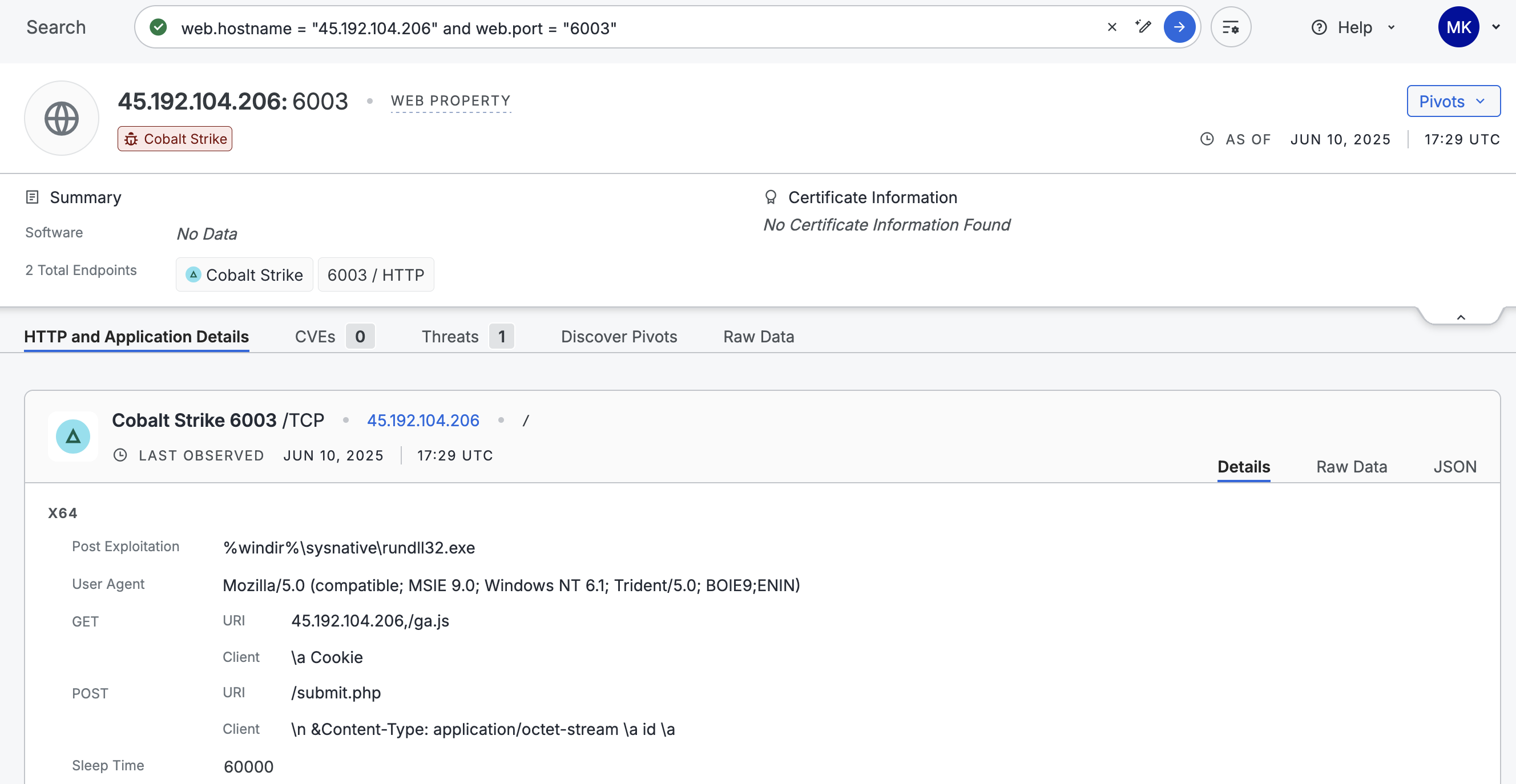
Cobalt Strike was detected on the web property record shown above. You can incorporate this IP into your blocklist or cross-reference it with egress traffic in your SIEM to determine whether there were any communications between your devices and this IP. You can monitor your network for any beacons by looking for periodic HTTP requests to 45.192.104.206 over port 6003.
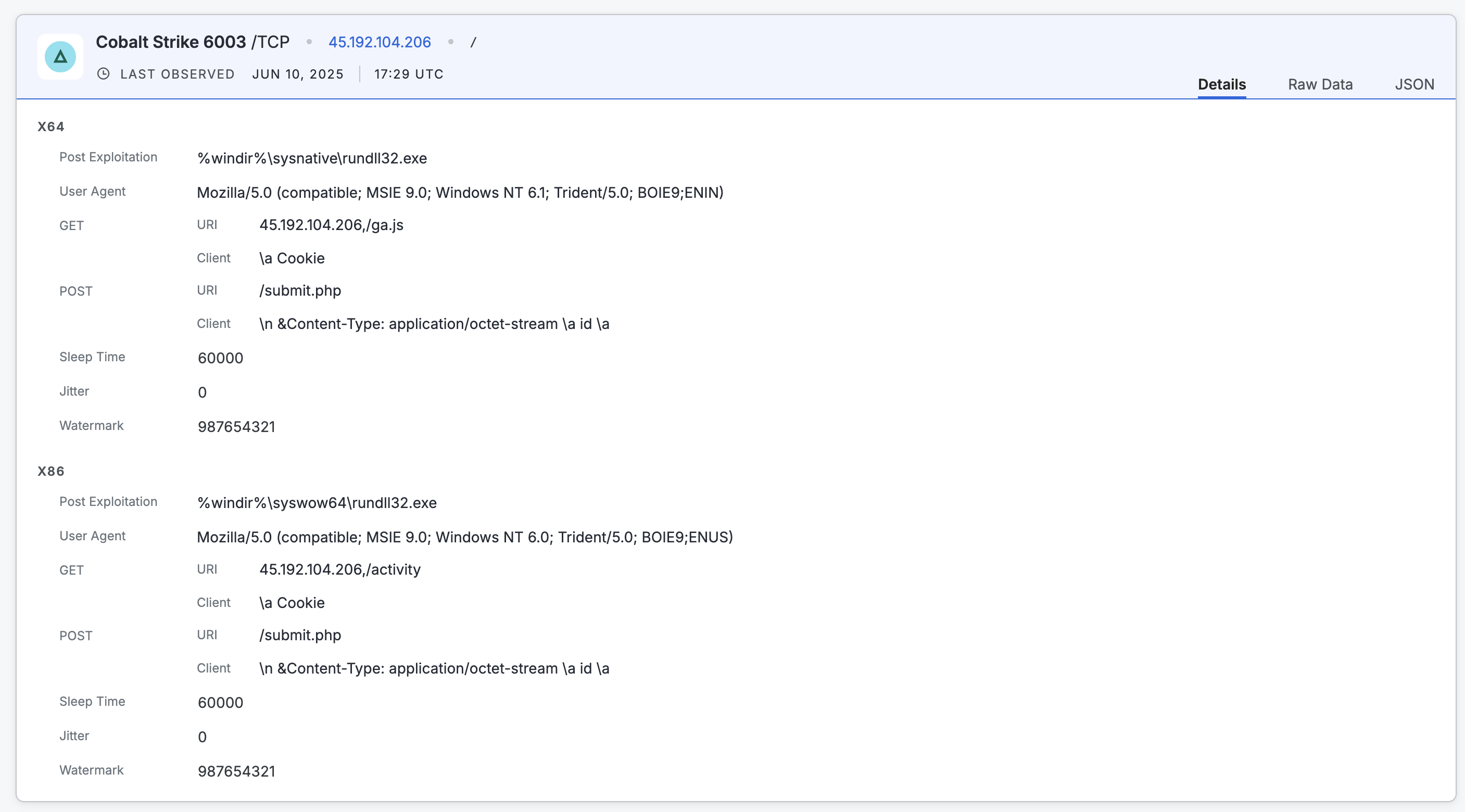
Additional application details for Cobalt Strike on the example web property record.
You can use the following application-specific data for further investigation. Most of this information is shown on the endpoint preview card. All scan data is available in the raw data output on the web property.
-
The URIs
/activity,/ga.js, and/submit.php. In the Cobalt Strike data object, these values are contained in thehttp_get.urifield. -
The user agent values
Mozilla/5.0 (compatible; MSIE 9.0; Windows NT 6.0; Trident/5.0; BOIE9;ENUS)andMozilla/5.0 (compatible; MSIE 9.0; Windows NT 6.1; Trident/5.0; BOIE9;ENIN). This information is located in theuser_agentfield for the Cobalt Strike endpoint. -
The
sleep_timevalue of 60 seconds. -
The absence of SSL. In the raw data output for this endpoint, the value for
sslisfalse.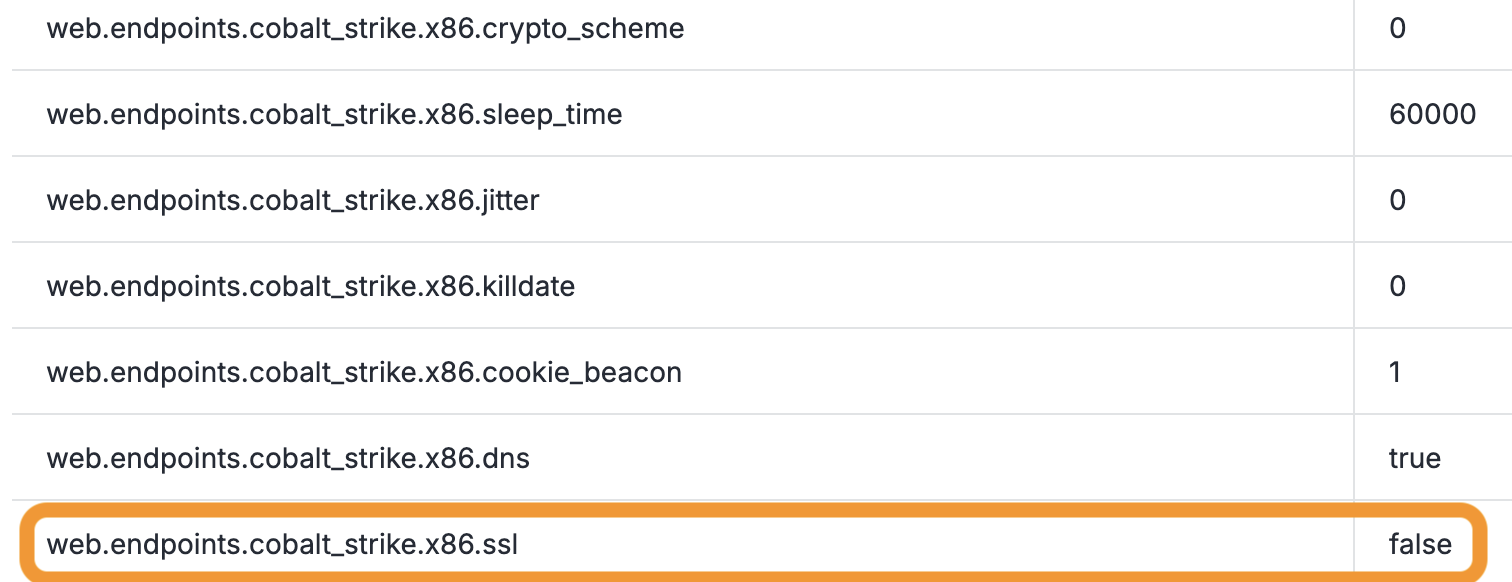
-
You can use additional details like the
watermarkvalue to determine whether this Cobalt Strike service is being used for red team testing or malicious purposes. Additionally, you can create a collection to track resources that use the same watermark for continuous monitoring and alerting.
The data provided by the Cobalt Strike scanner in this example is much richer than a standard HTTP scanner. For example, contrast the Cobalt Strike scan data with the data obtained from an HTTP scan in the Platform. The data from the HTTP scanner is significantly less actionable than the data from the app scanner.

FortiGate application data
FortiGate firewalls are widely used for perimeter defense. If exposed, they can reveal, VPN access points, administrative panels, and security policy misconfigurations. Attackers actively scan for exposed FortiGate VPN endpoints due to known vulnerabilities (such as CVE-2022-42475) that allow remote code execution.
This section explains how you can use application data from Censys to protect your organization using an example web property record that FortiGate was detected on.
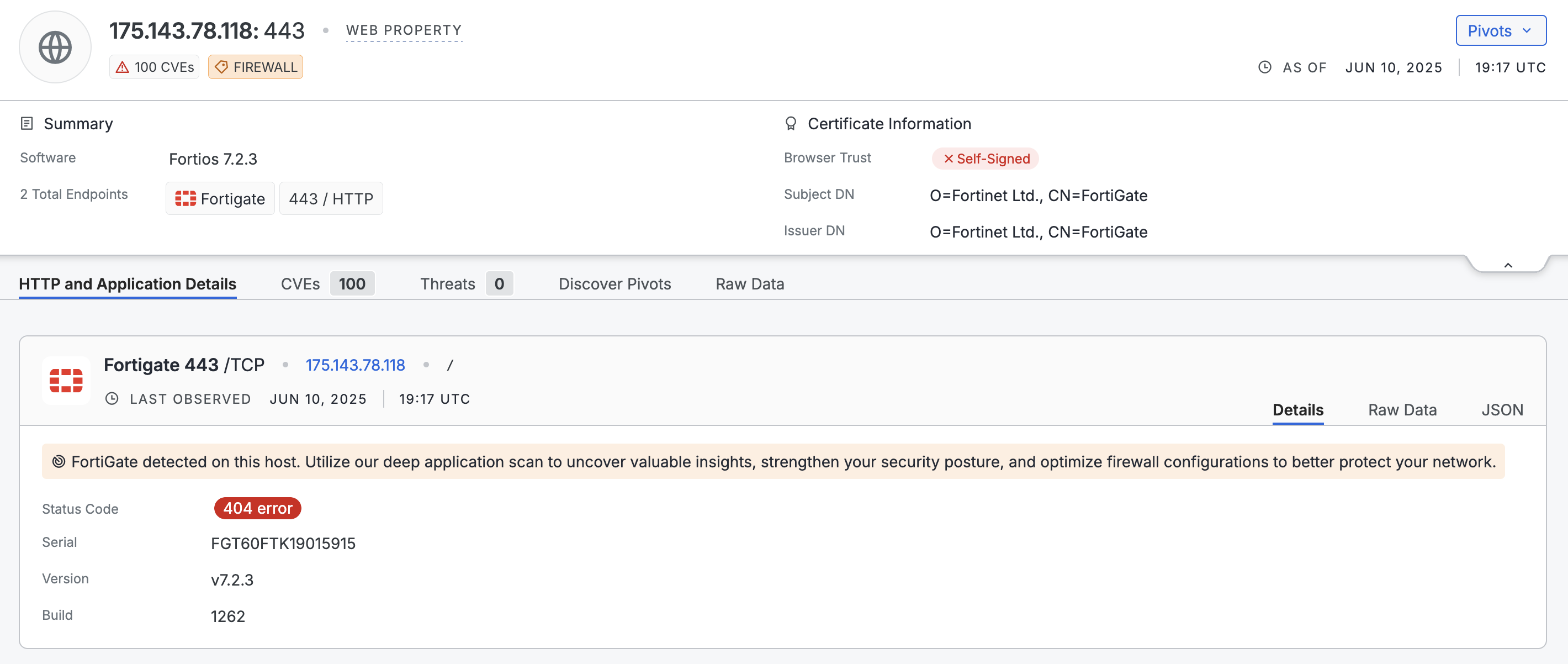
You can use the following application-specific data for further investigation. Most of this information is shown on the endpoint preview card. All scan data is available in the raw data output on the web property.
- This FortiGate instance is running version 7.2.3 (
web.endpoints.fortigate.versionin the raw data) and is mapped to multiple CVEs. - The TLS certificate is self-signed by Fortinet and is not trusted by major browsers (validation failed for NSS, Microsoft, Apple, Chrome).
- The
Strict-Transport-SecurityHTTP header is is present but missingincludeSubDomains(recorded inweb.endpoints.banner). Additionally, the max-age is less than one year. You could flag this for your team to harden response headers. - Based on known firewall standards (NIST, ISO 27001), externally accessible firewall UIs are non-compliant.
- Given the existence of several critical and high CVEs associated with this FortiGate version, it is worthwhile to upgrade to the latest version.
Endpoint data
Extensive data about exposed endpoint paths beyond the root / are available in the Platform datasets. In the Platform data schema, this information is available in the host.services.endpoints.path and web.endpoints.path fields. Examples of deeper endpoint paths include /webpages/login.html, /sonicui/7/login/, /admin/login.asp, and so on. This data allows you to uncover detailed information about web applications beyond the ones that Censys has named scanners and data objects for.
Use a report for hosts or web properties broken down by the path field to see example values that are useful for your investigations.
Updated 4 months ago