
AI Investigations
Use AI Investigations in the Censys Platform to comprehensively analyze indicators and discover related infrastructure in the Censys Internet Map.
AI Investigations removes the manual and time-consuming components of security operations work. A Censys AI investigation checks each entity's history, pivots to and analyzes potentially related assets, and profiles web resources in parallel. The AI investigator then connects the results, ranks what matters, and hands you a formatted report of findings.
Each step is accompanied by evidence and reports that explain the context for each pivot and its place in an investigation. You can review every step to understand its sources, the investigator's confidence, and the reasoning behind it.
AI Investigations is available to customers with access to the Adversary Investigation module.
Start an investigation
Go to the AI Investigations page in the Platform web console.
In the prompt window, you can use the following to start an investigation:
- IP addresses.
- Domain names and URLs.
- When you provide URLs, the investigator will extract domains from them and use the domains as indicators.
- Host and port pairs.
- An intel report that contains the indicators listed above.
You can submit up to 100 indicators per investigation.
NoteYou can also start an investigation via the API with the Investigations: Create job endpoint.
The screenshots shown on this page are from an investigation that used the IP addresses and domain names from an Elastic Security Labs report on a fraud toolkit that targeted customers of Mexican banks.
You can also provide historical context in your prompts to help the agent narrow its focus. You can input:
- Single dates, such as "activity was noted on July 30, 2024."
- A month, quarter, half of a year, or year time range.
- Explicit closed time ranges, such as "20 January 2025 through 5 February 2025."
Hit enter to initiate the investigation. It may take several minutes for an investigation to run and complete.
How investigations work
The investigation agent examines your indicators and their history in the Censys Internet Map. It finds shared parsed data attributes that can be used to uncover additional indicators and related infrastructure.
Depending on the results of its investigation, the agent may prompt you to make a decision about which clusters or evidence to pursue. These prompts will be presented in the chat window with additional context.
The Evidence tab on the right side of page is a comprehensive audit trail for every tool call, decision tree, and pivot used in the investigation, as well as outcomes. Click an evidence entry or download it to see its details.
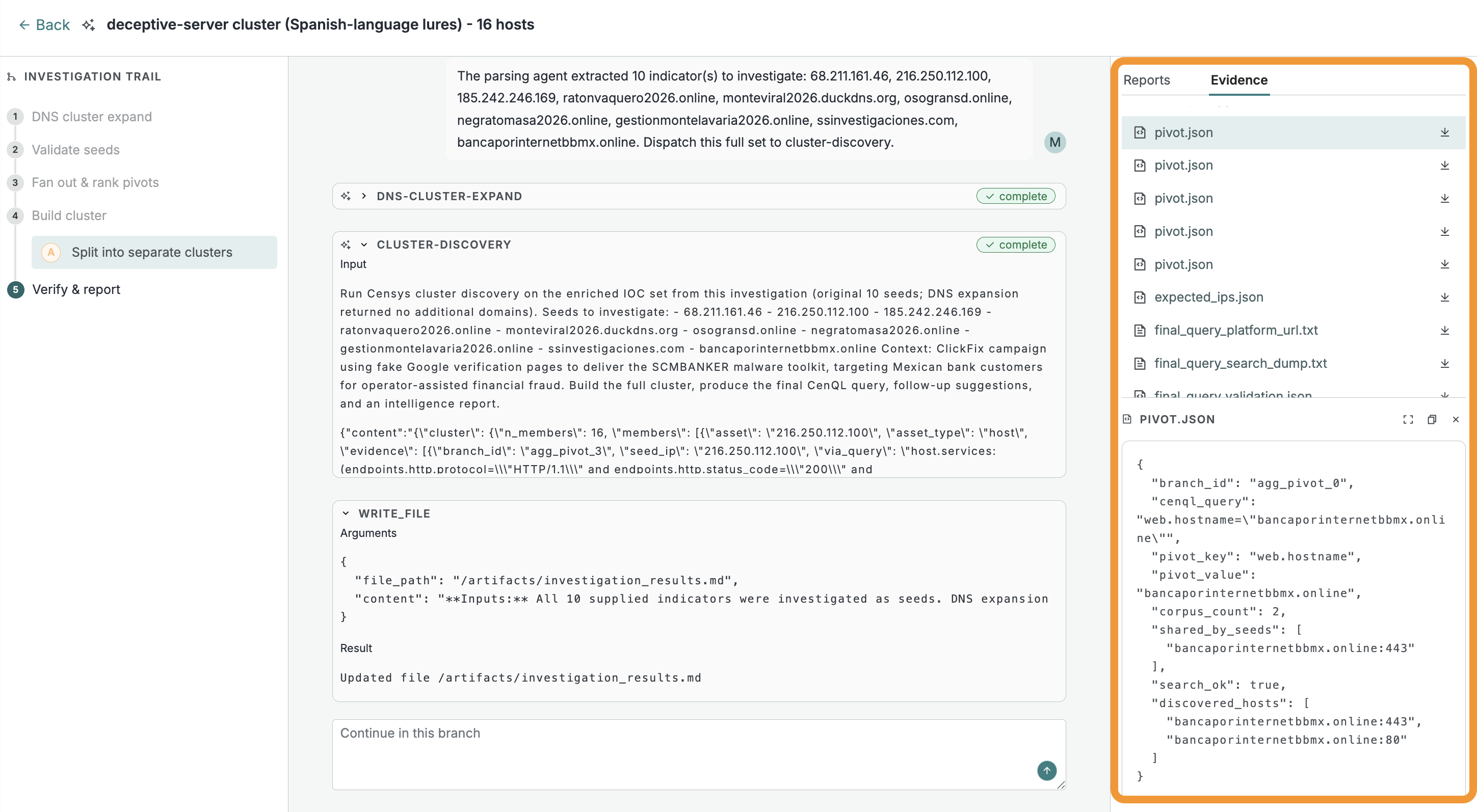
The evidence artifacts for an investigation. In this screenshot, one of the pivots is selected. The detail view shows the data key-value pair that was targeted, in this case web.hostname: bancaporinternetbbmx.online, and its results.
When the agent completes its investigation, it will provide a high-level summary of its findings. This summary includes the parsed inputs you provided, any cluster of assets discovered, and a Censys Query Language (CenQL) query that targets the Censys scan data shared by the cluster. You can use the query to review the assets in the Platform.
The files provided in the Reports tab may include:
-
narrative_llm: A complete and detailed narrative explanation of the investigation, including pivot visualizations and decision trees. It also includes recommended actions.
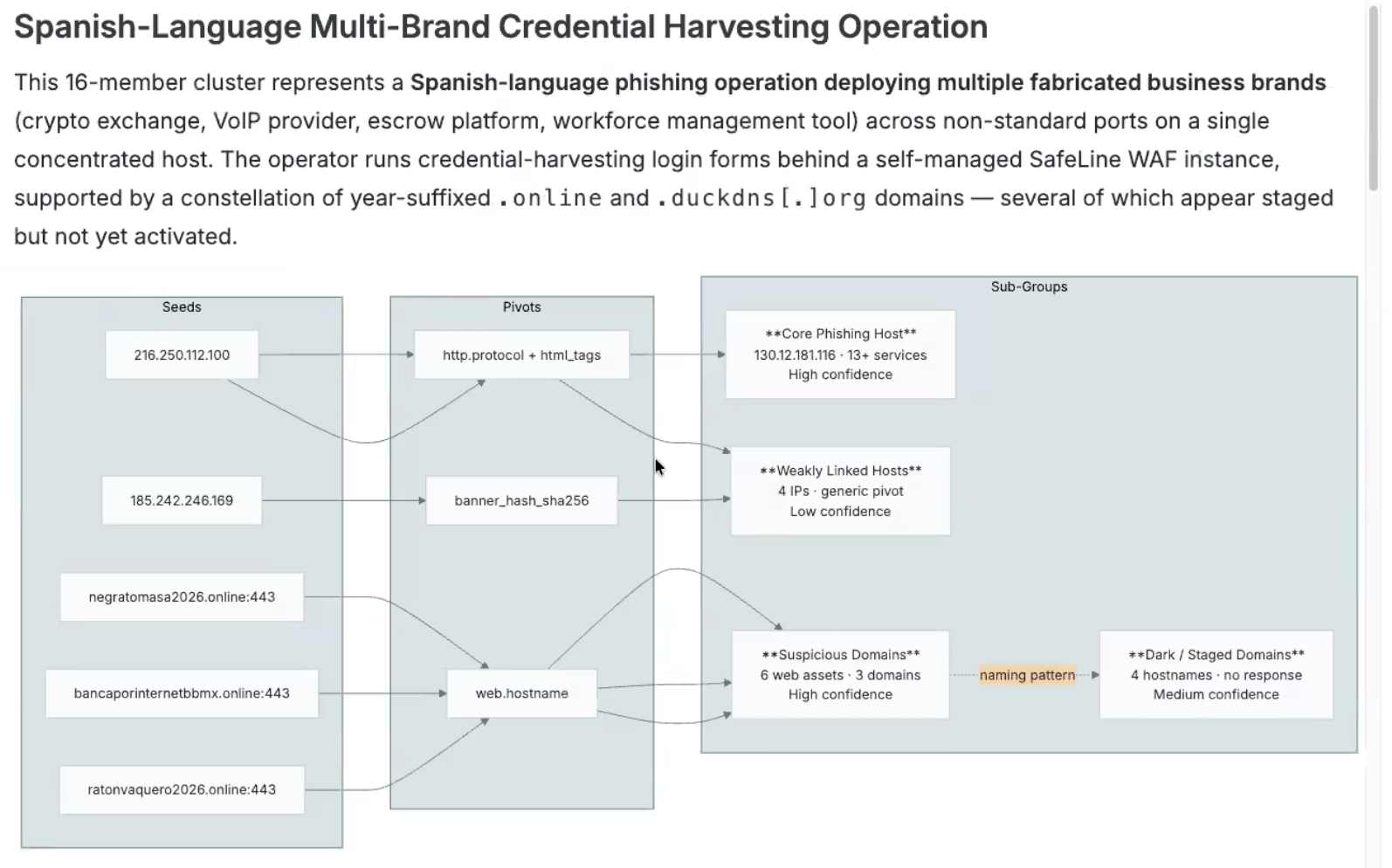
An excerpt from an example narrative_llm file for an investigation.
-
intelligence_report.md: A polished, reformatted version of the deterministic investigation report provided in report.md. It maintains the same structure and data (cluster table, CenQL queries, Platform links) with targeted enhancements. The raw body summary is replaced by the body_intelligence.md analysis (described below), the decision tree is rendered as a Mermaid diagram, and the header is compacted for scannability. Invalid IOCs (hashes or certificates the Platform couldn’t resolve) are appended deterministically as a separate section. This report is provided only when the deterministic report was produced and LLM synthesis succeeded.
-
body_intelligence.md: An analysis of HTTP response body data collected from cluster representative hosts. Explains what the hosts are serving, such as page titles, status codes, server banners, TLS certificate SANs, lure-pattern matches, and external script-src URLs, organized by commonalities and differences. Replaces the raw body summary in the final intelligence report. Available only when body data was collected and LLM synthesis succeeded.
Limits and costs
It does not cost any Censys Credits nor incur any extra cost to execute AI investigations.
A user may only run five concurrent AI investigations at a time.
An organization may perform a maximum of 150 investigations per week. This limit applies to investigations started via the UI and API.
Investigations are accessible for seven days after you execute them. You can interact with a previous investigation to reset the retention period for it.
Updated 29 days ago