
Palo Alto Cortex XSOAR/XSIAM Integration
The Censys for Palo Alto Cortex XSOAR/XSIAM integration adds commands to:
-
Enrich IPs, web properties, and certificates in Cortex with Censys Platform data.
-
Initiate a Censys rescan of a host or web property.
-
Run a search across Censys data.
-
Retrieve scan history for an IP address.
-
Initiate a CensEye automated pivoting job to find assets related to an IP, web property, or certificate.
Additionally, it includes a playbook for enriching IPs, domains, and certificates and a dashboard that shows all Censys actions executed using the app.
This guide walks through how to set up and use the Censys for Palo Alto Cortex XSOAR/XSIAM.
NoteMost of the Censys API calls used by this integration will deduct credits from your organization's balance. Reference the API documentation for more information on credit costs.
Prerequisites
-
Cortex version 6.0.0 or newer.
-
A Cortex admin user with access to your instance.
-
Your Censys Platform organization ID.
- To obtain your organization ID:
-
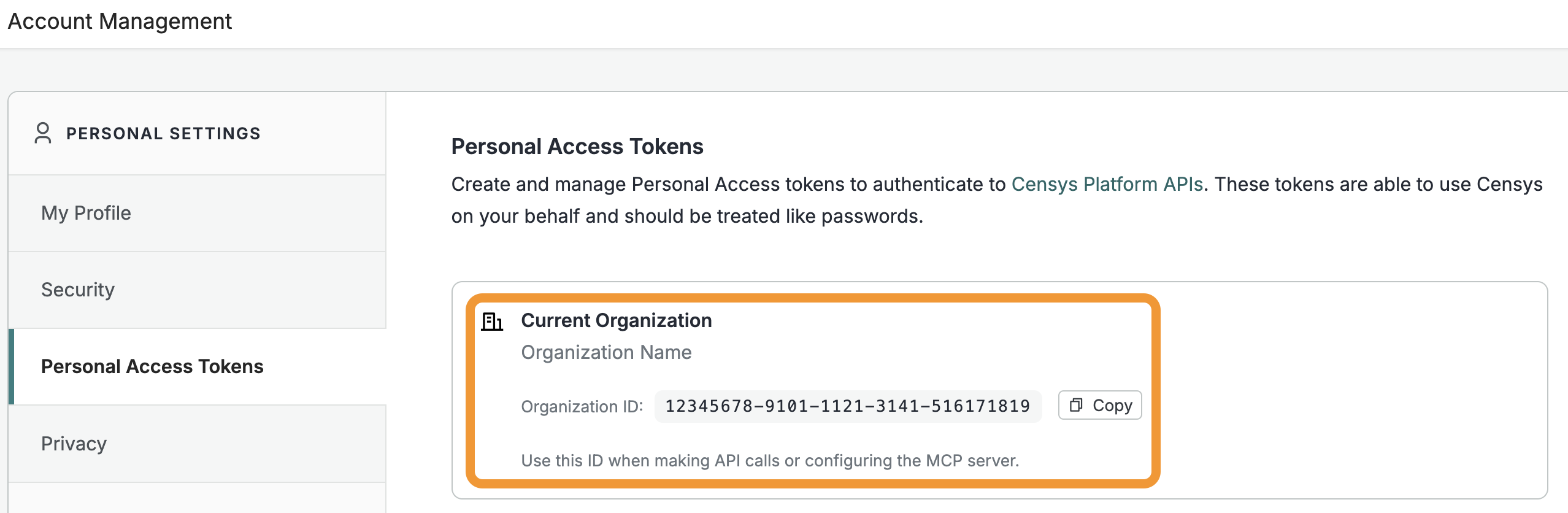
Open the Platform web console and ensure that your organization account is selected. Go to Settings > Account Management > Personal Access Tokens.
-
The ID for your organization is shown in the "Current Organization" box. Click Copy to copy it to your clipboard.
-
- To obtain your organization ID:
-
A Censys Platform Personal Access Token (PAT). Instructions on how to create and manage PATs are available in the API documentation.
Installation and configuration
- Retrieve and install the integration from the Cortex Marketplace.
- On the app configuration page:
- In the "API Token" field, enter your PAT.
- In the "Organization ID" field, enter your organization ID.
- (Optional) Check the box for Use enrichment API for the ip command to use the get host enrichment API endpoint instead of the get host API endpoint when you use the
ipcommand.- The host enrichment API is purpose-built to help security teams operationalize external internet data without the friction of traditional credit consumption. It provides a curated, fixed subset of host IPv4 or IPv6 data designed specifically for high-volume, automated lookups in SOC environments, such as SIEM and SOAR integrations.
- If the get host enrichment API call fails, the command will automatically fall back to using the get host API endpoint.
- Click Save.
Censys for Palo Alto Cortex commands
The Censys for Cortex integration adds the following commands that can be executed via the automation browser or CLI.
cen-view
cen-viewcen-view returns Censys data for the target IP address or SHA256 certificate hash.
Input
| Argument name | Description | Required |
|---|---|---|
query | The target asset. Can be an IP address or SHA256 certificate hash. | Yes |
index | The index from which to retrieve data. Can be ipv4 or certificates. | Yes |
Example command
The following command will return all the Censys data available to your Censys account for the IP 8.8.8.8.
!cen-view index=ipv4 query=8.8.8.8cen-search
cen-searchcen-search runs a search query across Censys Platform datasets. Queries must use Censys Query Language (CenQL) syntax. It returns previews of assets matching the query.
Input
| Argument name | Description | Required |
|---|---|---|
query | Query used to search for hosts with matching attributes. Uses CenQL. | Yes |
page_size | The maximum number of hits to return in each response (minimum of 0, maximum of 100). (Applies for the host search.). Default is 50. | No |
limit | The number of results to return. Default is 50. | No |
index | The index from which to retrieve data. Can be ipv4 or certificates. | Yes |
fields | Censys data fields to return. | No |
Example command
The following command will search for and return certificates with the issuer common name "Let's Encrypt".
!cen-search index=certificates query="cert.parsed.issuer.common_name: "Let's Encrypt""cen-host-history-list
cen-host-history-listcen-host-history-list retrieves the Censys host scan history for an IP address.
Input
| Argument name | Description | Required |
|---|---|---|
host_id | The IP address of a host. | Yes |
start_time | The starting point of the scan timeline that you want to return. Supported date formats are Example values include | Yes |
end_time | The end point of the scan timeline that you want to return. Uses the same formats as shown above for start_time. | Yes |
Example command
The following command will return the Censys host history for the IP 8.8.8.8 from January 1, 2026 through January 7, 2026.
!cen-host-history-list host_id=8.8.8.8 start_time=2026-01-01 end_time=2026-01-07cen-related-infrastructure-list
cen-related-infrastructure-listcen-related-infrastructure-list initiates a CensEye pivot analysis job for a target host, web property, or certificate. It returns a table containing matched key-value pairs, the count of assets that share that pair, and a link to view all matching assets in Censys. To use this command, your Censys organization must have access to the Adversary Investigation module.
Input
| Argument name | Description | Required |
|---|---|---|
ioc_type | The type of asset to run CensEye on. Can be host, web property, or certificate. | Yes |
ioc_value | The IP address, hostname and port pair, or SHA-256 hash of the target. | Yes |
Example command
The following command will initiate a CensEye job for the IP address 8.8.8.8.
!cen-related-infrastructure-list ioc_type=host ioc_value=8.8.8.8cen-rescan
cen-rescancen-rescan initiates a rescan for a known host service at a specific IP and port or hostname and port.
Input
| Argument name | Description | Required |
|---|---|---|
ioc_type | The target of the rescan. Use service for a host IP and port or web property for a hostname and port. | Yes |
ioc_value | The IP (for service) or hostname (for web property). | Yes |
port | The target port number. | Yes |
protocol | The This argument is required only if the | No |
transport_protocol | The This argument is required only if the | No |
Example command
The following command will initiate a rescan of the HTTP service on port 443 running on 8.8.8.8.
!cen-rescan ioc_type=service ioc_value=8.8.8.8 port=443 protocol=HTTP transport_protocol=TCPdomain
domaindomain returns all related IPs as relationships.
Input
| Argument name | Description | Required |
|---|---|---|
domain | A comma-separated list of domains to check. | Yes |
Example command
The following command will return all IPs related to amazon.com and google.com.
!domain domain=amazon.com,google.comip
ipip runs reputation on the target IP address.
Input
| Argument name | Description | Required |
|---|---|---|
ip | IP address or a list of IP addresses to assess reputation. | Yes |
use_enrichment_endpoint | Whether to use the get host enrichment API endpoint instead of the get host API endpoint. Overrides your configured integration settings. | No |
Example command
The following command will return information on the IP addresses 8.8.8.8. and 8.8.4.4.
!ip ip=8.8.8.8,8.8.4.4Indicator enrichment playbook
The indicator enrichment playbook can be executed within an incident or manually outside of an incident.
Run the playbook in an incident
- Open the incident and go to Work Plan.
- Select and run the Indicator Enrichment - Censys playbook.
Run the playbook outside of an incident
- Navigate to Playbooks and search for "censys".
- Select the Indicator Enrichment - Censys playbook.
- Click Edit then Run.
Use the Censys SOAR dashboard
The dashboard displays the total number of times the Censys playbook and Censys commands have been executed, including breakdown by execution type.
Updated 11 days ago