
Host Reputation
In the Censys Platform, hosts are assigned a reputation label and score that describe their riskiness. This information enables you to prioritize alerts with IP indicators faster and perform triage and analysis more effectively with a transparent and consistent scoring methodology.
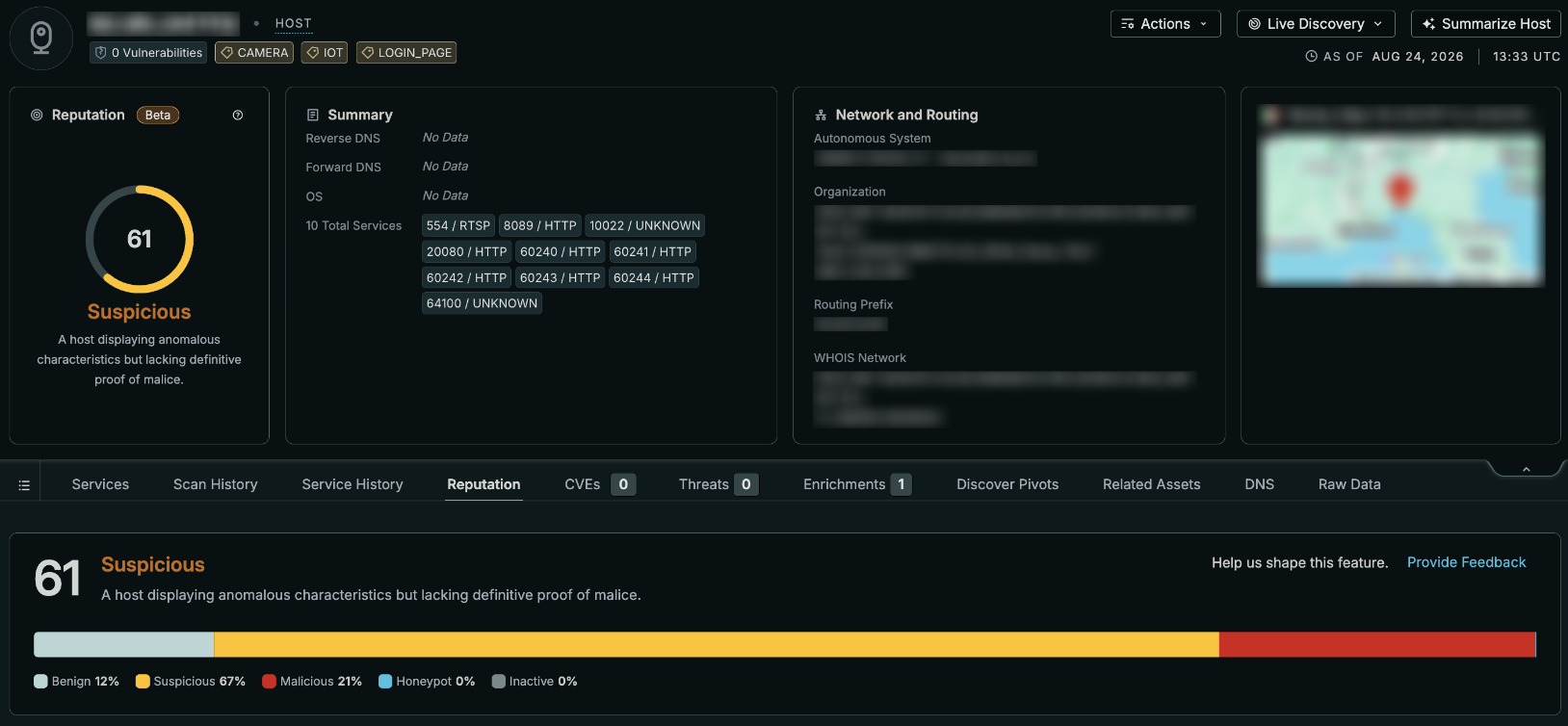
An example host and its reputation score in the Platform UI.
Censys host reputation labels and scores are generated using a machine-learning model trained on a broad set of host signals to assign each signal a share of the credit for the model's call.
Labels and scores are always based on the host's most recent scan data.
Each host receives:
- A category label that describes what the model believes the host is: Benign, Suspicious, Malicious, Honeypot, or Inactive.
- A 0 to 100 score for fast triage and sorting.
- A label confidence level.
- Evidence for the top five signals that influenced the assessment.
See the reputation data availability section below for information on which license tiers have access to reputation information.
Reputation category labels
Censys classifies every host with one of the following five labels.
Note that Honeypot and Inactive describe what a host is, not how risky it is. A risk score is not shown for hosts with either of those labels. See more in the risk score section below.
| Category/label | Description |
|---|---|
Malicious (MALICIOUS in raw data) | This host is actively engaged in or definitively linked to harmful activities. |
Suspicious (SUSPICIOUS in raw data) | This host displays anomalous characteristics but lacks definitive proof of malicious intent. |
Benign (BENIGN in raw data) | This host is operating normally and has no indicators of compromise, risk, or malicious intent. |
Inactive (INACTIVE in raw data) | This host is unresponsive, lacks active services, or shows no meaningful network footprint. |
Honeypot (HONEYPOT in raw data) | This host is intentionally mimicking a vulnerable target to attract and log activity. |
Risk scores
Hosts are assigned a risk score (host.reputation.score) that ranges from 0 to 100. The risk score is a normalized continuous scale that reflects the model's confidence of risk-bearing features, not a direct indication of the resultant label. A host labeled Suspicious can outscore a Malicious host due to the interaction of risk-bearing features, but generally fall within typical ranges.
| Score | Interpretation |
|---|---|
| Near 0 | High confidence the host is benign. |
| Around 30 to 50 | The model leans benign but has picked up some ambiguous or mixed signals. Some hosts may still be labeled Suspicious. |
| Close to 60 | The model considers Suspicious the most likely read. Anomalous behavior is present without conclusive proof of harm. |
| Close to 100 | High confidence the host is engaged in malicious activity. |
The score is a weighted blend of the model's probability estimates (p_benign, p_suspicious, and p_malicious) for the three risk-bearing classes, the same Benign, Suspicious, and Malicious probabilities shown in the confidence breakdown for every host.
score = ((p_benign / p_risk) × 0) + ((p_suspicious / p_risk) × 60)) + ((p_malicious / p_risk) × 100))In the formula, p_risk is the sum of p_benign, p_suspicious, and p_malicious.
Honeypot and Inactive probabilities are excluded from p_risk since they describe what the host is rather than how risky it is. This is also why the score alone doesn't determine the label. A host with a large combined Suspicious and Malicious share but almost no Benign share can score close to the high end even when Suspicious, not Malicious, is the model's top pick.
Score data normalization
In raw data and API responses, score values are floating-point numbers. On host asset pages, on host preview cards, and in report aggregations, reputation scores are shown as integers. For example, a raw reputation score of 0.812 is represented as 81 in the UI.
Because of this normalization, when you run reports on reputation score data, you will see multiple buckets that appear to have the same value. This is because aggregation buckets are based on the raw data floating-point numbers, not the normalized integers.
In search queries, you can input reputation scores as integers and they will search across the appropriate floating-point number. For example, host.reputation.score > 80 will return assets with a value greater than 0.800.
Hosts without risk scores
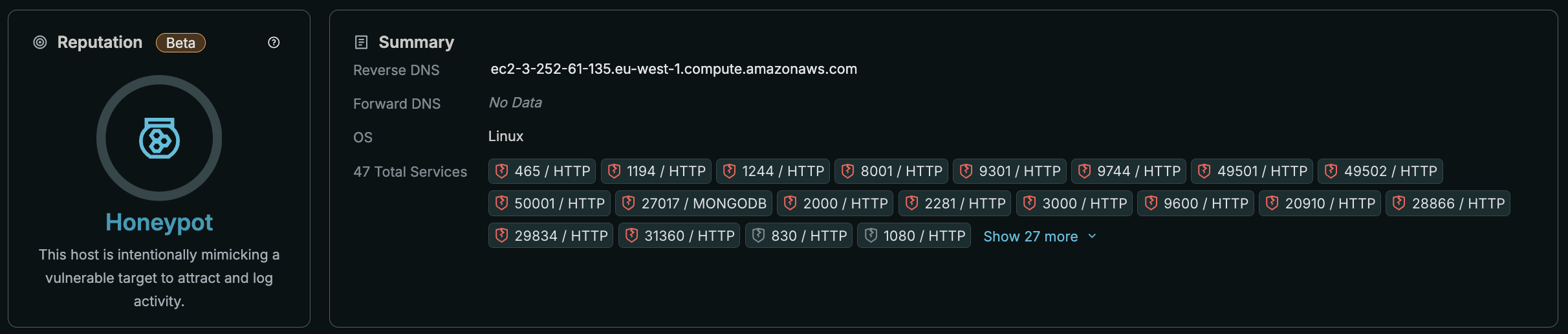
If the model is more than 80% confident that a host is a Honeypot or Inactive, Censys does not display a numeric risk score for it. Showing a 0 to 100 number for a Honeypot or Inactive host would be misleading, since those labels describe the nature of the host, not its threat level.
Reputation signals
Host reputation evaluation draws on a broad set of signals Censys collects about internet-facing infrastructure, including the following indicators. These categories describe the kinds of evidence the model draws on, not its literal inputs. In the data schema, these values are present in host.reputation.evidence.feature.category.
- Threat intelligence: direct evidence of tracked malicious activity, including command and control (C2), phishing, webshells, botnets, cryptomining, and related threat classes.
- Censys content and behavior labels: Censys' own classification of what a host is doing, such as acting as a honeypot, open directory, proxy, or WAF.
- Software and infrastructure fingerprinting: matches against known attacker tooling, frameworks, and infrastructure.
- External reputation: third-party scan and noise classification, including GreyNoise.
- Anonymization and privacy: VPN, proxy, relay, and Tor indicators.
- Vulnerability exposure: disclosed CVEs, including known-exploited vulnerabilities and severity.
- TLS and certificate hygiene: protocol version, certificate validity, and certificate diversity.
- Service and port surface: what's exposed, and how typical or atypical that footprint is.
- DNS footprint: hostnames and resolution patterns associated with the host.
- WHOIS registration: network age, ownership, and abuse-contact data.
- Network and geographic identity: network operator and geolocation context.
Reputation evidence
Every assessment includes a panel showing the five signals that most influenced it. This information is provided in the Platform UI on the Reputation tab and is retrievable via API. Each of the top five signals is ranked by how much weight each one carried, not the full underlying signal set.
The following information is provided for each of the top five signals:
- Contribution (
host.reputation.evidence.feature.contribution): how much a signal influenced the assessment, shown as a signed percentage of that signal's share of the total influence behind the assessment, and which way it pointed.- Support for the assigned label is indicated by a positive contribution value, while opposition is indicated by a negative value. This works the same way for every label, including Honeypot and Inactive. Evidence always explains why the host received its label, not just whether the risk score went up or down.
- Feature (
host.reputation.evidence.feature.name): A plain-language description of what was observed, for example “Active C2 activity” or “Self-signed TLS across multiple services,” rather than a raw technical field name. - Value (
host.reputation.evidence.feature.value): The underlying value Censys observed, for exampletrue, a port number, or an organization name. - Category
host.reputation.evidence.feature.category): The evidence category for the signal, likethreat_intelligenceorservice_surface.
In the UI, evidence information is available in a human-readable table on the Details tab and in raw data and JSON formats.
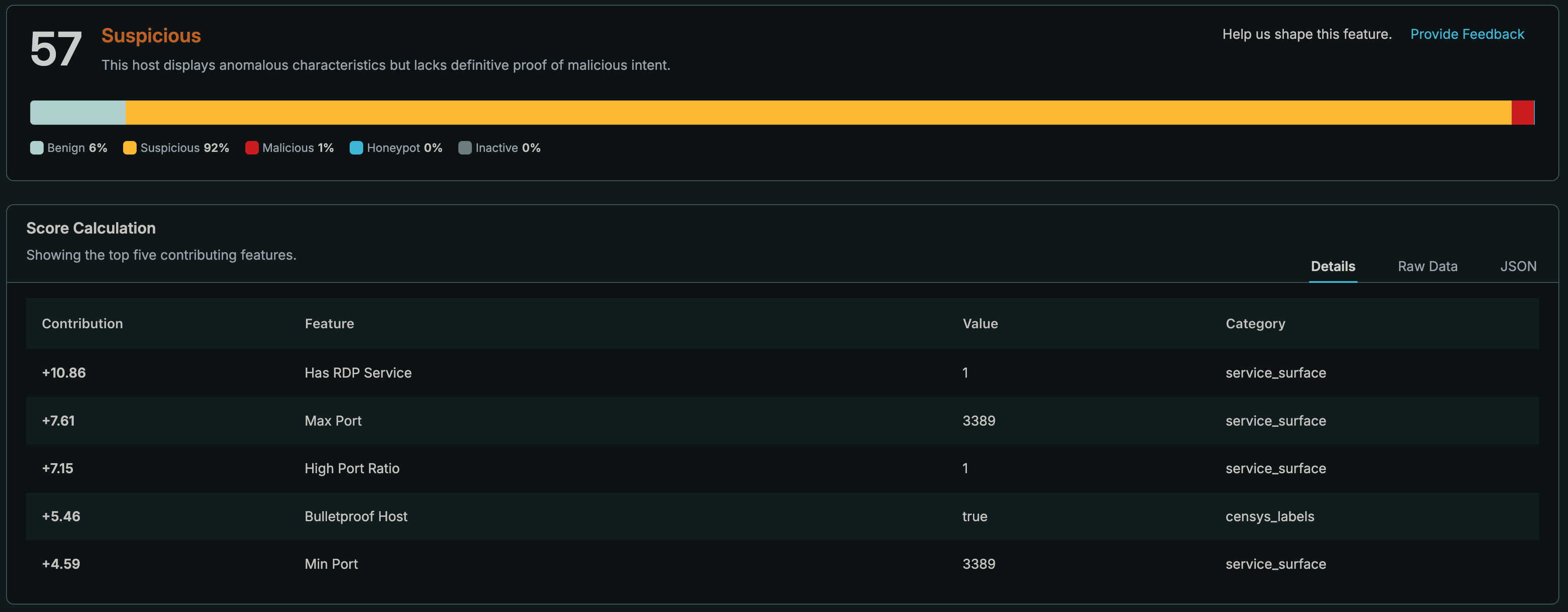
In the example score calculation shown above, the model produced a score of 57 and a Suspicious label. The host only had one open service on it, RDP on port 3389. The top five contributing factors are:
- The presence of an open RDP service.
- A max and minimum port of 3389.
- A high port ratio. This feature looks for HTTP, SSH, RDP, SMTP, FTP, and TELNET services running on a high port. In this case the ratio is 1 as there is one service and it is running on 3389.
- The host's presence on "bulletproof" infrastructure, which generally ignores abuse complaints, takedown orders, and law enforcement requests.
Percentages reflect each signal's share of the total influence on this example host's assessment, measured against a typical host. Only the five strongest are shown. A negative value means that signal pointed away from the assigned label, but was outweighed by the others.
Confidence and reputation category breakdown
Alongside the reputation label, Censys shows a confidence percentage and a full confidence breakdown across all five classes. This lets you see, for example, that a host labeled Malicious at 55% confidence still carries a smaller amount of Suspicious probability, which is useful context when a score sits close to a boundary.

The category breakdown for a host with a score of 79 and a Malicious label. The confidence level for the malicious label is 55%.
Reputation data availability
The following table describes which data fields are available to different user entitlement levels.
| Data group | Censys Free | Censys Starter | Censys Search | Censys Core | Censys Core with Adversary Investigation module |
|---|---|---|---|---|---|
Reputation score and label (host.reputation.score and host.reputation.score.label) | No | No | No | Yes | Yes |
Reputation model version (host.reputation.model_version) and class probabilities host.reputation.class_probabilities,host.reputation.class_probabilities.label, andhost.reputation.class_probabilities.probability) | No | No | No | Yes | Yes |
Full evidence for top five evidence categories (host.reputation.evidence,host.reputation.evidence.evidence_score,host.reputation.evidence.feature.id,host.reputation.evidence.feature.name,host.reputation.evidence.feature.value,host.reputation.evidence.feature.contribution, andhost.reputation.evidence.feature.category) | No | No | No | Yes | Yes |
Historical reputation data
Historical reputation score data is not available. On historical hosts, the reputation score shown in the raw data is the reputation score based on the most recent scan data. It is not reflective of the reputation score of the host at a particular point in time.
Changes from the legacy host reputation model
From April to September 2026, the Censys Platform used a different reputation scoring model during an initial test period. This model did not use machine learning to evaluate and weight host signals. The legacy model was deprecated with the launch of the new model.
When the new model launched, some unused data fields in the host.reputation data object were deprecated while some were changed. The following table describes the most important legacy host reputation data fields that were replaced or changed.
| Legacy host reputation data field | Change from legacy to current model |
|---|---|
host.reputation.score_level | Deprecated. Replaced by host.reputation.score.label. |
host.reputation.evidence | This object now returns up to five entries ranked by absolute value of feature.contribution. |
host.reputation.evidence.category | Deprecated. Replaced by host.reputation.evidence.feature.category . |
host.reputation.evidence.evidence_score | Deprecated. Replaced by host.reputation.evidence.feature.contribution. |
Updated 22 days ago